
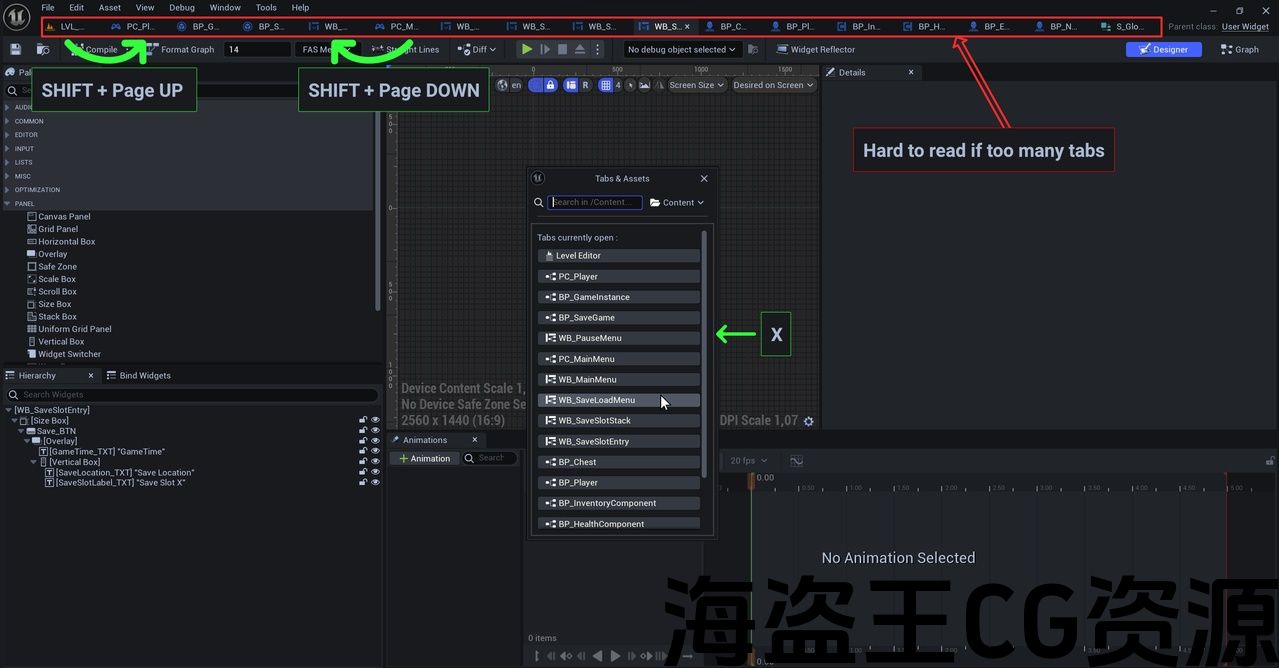
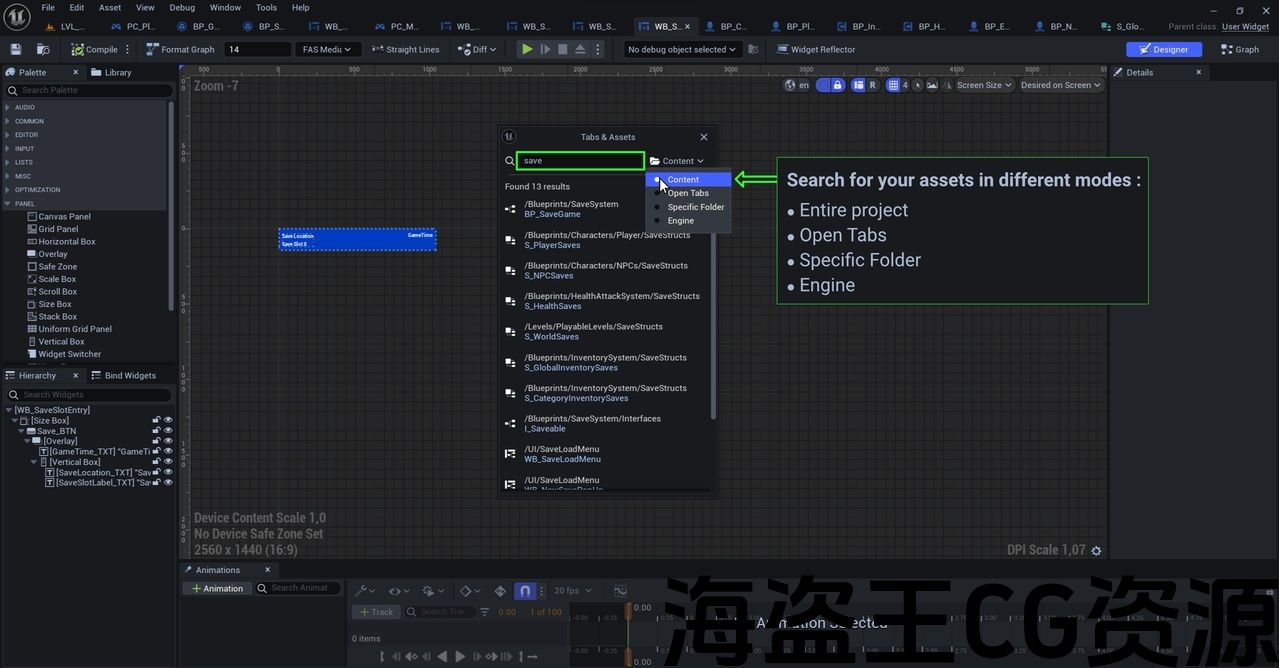
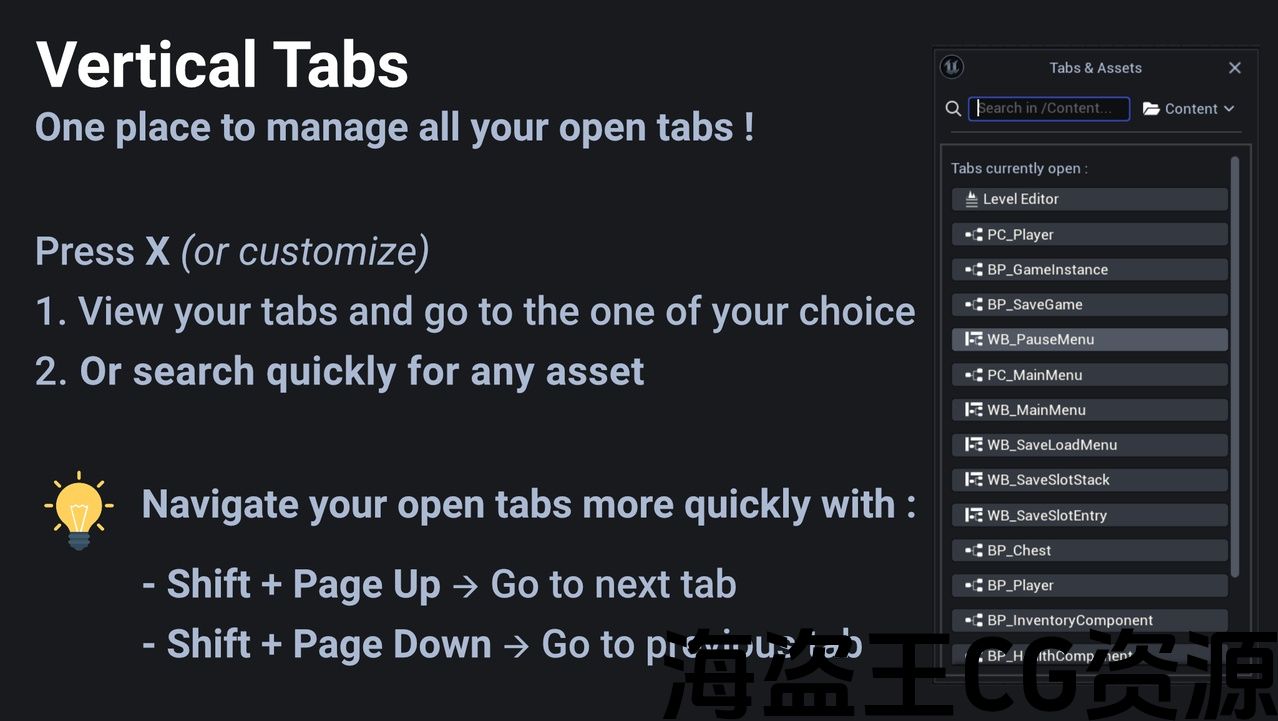
Feature 1: Toggle Pop-Up Menu with Shortcut
- Description: Allows users to quickly open and close a pop-up listing all open tabs by pressing a keyboard shortcut (Default X). This feature facilitates tabs navigation without the need to manually search through the editor’s interface. There is also a search bar so that users can quickly open any asset in the project. There are also shortcuts for moving to the next/previous tab.
Module 1: VerticalTabs
- Module Type: Editor
- Description: The main module of the plugin that handles command registration, pop-up creation and management, and integration with various asset editors (Blueprints, Materials, etc.). Features include:
- A floating window showing all currently open tabs and assets
- Quick search functionality to find and open any asset in the /Content folder
- Tab navigation shortcuts to cycle between open tabs (Next/Previous)
Number of Blueprints
- 0 Blueprints
Number of C++ Classes
- 1 C++ Class
- FVerticalTabsModule: Manages the plugin’s lifecycle, user commands, and interaction with the Unreal Editor.
Network Replicated
- No
Supported Development Platforms
- Windows => Yes
- MAC => Yes
- Linux => Yes
功能 1:使用快捷键切换弹出菜单
- 说明:允许用户通过按键盘快捷键(默认 X)快速打开和关闭列出所有打开的选项卡的弹出窗口。此功能有助于选项卡导航,而无需通过编辑器界面手动搜索。还有一个搜索栏,以便用户可以快速打开项目中的任何资产。还有用于移动到下一个/上一个选项卡的快捷方式。
模块 1:垂直选项卡
- 模块类型:编辑器
- 说明:插件的主要模块,用于处理命令注册、弹出窗口创建和管理以及与集成各种资源编辑器(蓝图、材质等)。功能包括:
- 显示所有当前打开的选项卡和资源的浮动窗口
- 快速搜索功能,可查找并打开 /Content 文件夹中的任何资源
- 选项卡导航快捷方式可在打开的选项卡(下一个/上一个)之间循环
数量蓝图
- 0个蓝图
C++类数量
- 1个C++类
- FVerticalTabsModule:管理插件的生命周期、用户命令以及与Unreal的交互编辑器。
网络复制
- 否
支持的开发平台
- Windows => 是
- MAC =>是
- Linux => 是
Tired of losing track of your open asset tabs? VerticalTabs brings order to your workspace with a streamlined, vertical popup that keeps everything in view. No more accidental closures.
Key Features
- Clean Vertical popupInstantly see all open asset tabs in a compact, scrollable interface.
- One Shortcut to AccessPress X (customizable) to open or close the VerticalTabs popup.
- Seamless IntegrationWorks across all editors—Blueprints, Materials, Level Editor, and more.
- Built-in SearchQuickly find any asset using the integrated search bar. Just type and go.
- Context-Aware PositioningThe popup appears near your cursor, so it’s always where you need it.
- Lightweight & EfficientOptimized for performance with minimal overhead.
- Bonus : Fast Navigation between tabs
- Next tab: Shift + Page Up (customizable)
- Previous tab: Shift + Page Down (customizable)
Quick Setup
- Download from the Fab Marketplace.
- Install with one click.
- Press X and you’re ready to go—no configuration needed.
Custom Shortcuts
To change default keys:Edit → Editor Preferences → General → Keyboard ShortcutsSearch for Vertical Tabs Plugin.
厌倦了失去对打开的资产选项卡的跟踪? VerticalTabs 通过简化的垂直弹出窗口让您的工作空间井井有条,让所有内容都清晰可见。不再意外关闭。
主要功能
- 干净的垂直弹出窗口在紧凑的可滚动界面中立即查看所有打开的资产选项卡。
- 一个访问快捷方式按 X(可自定义)可打开或关闭垂直选项卡弹出窗口。
- 无缝集成适用于所有内容编辑器 – 蓝图、材质、关卡编辑器等。
- 内置搜索使用集成搜索栏快速查找任何资源。只需输入即可。
- 上下文感知定位弹出窗口出现在您的光标附近,因此它始终位于您需要的位置。
- 轻量级且高效以最小的开销优化性能。
- 奖励:在之间快速导航选项卡
- 下一个选项卡:Shift + Page Up(可自定义)
- 上一个选项卡:Shift + Page Down(可自定义)
快速设置
- 从 Fab Marketplace 下载。
- 使用一个安装单击。
- 按 X 即可开始 — 无需配置。
自定义快捷键
要更改默认键:编辑 → 编辑器首选项 → 常规 → 键盘快捷键搜索垂直选项卡插件。
声明:本站所有资源都是由站长从网络上收集而来,如若本站内容侵犯了原著者的合法权益,可联系站长删除。
评论(0)