
Features: (Please include a full, comprehensive list of the features of the product)
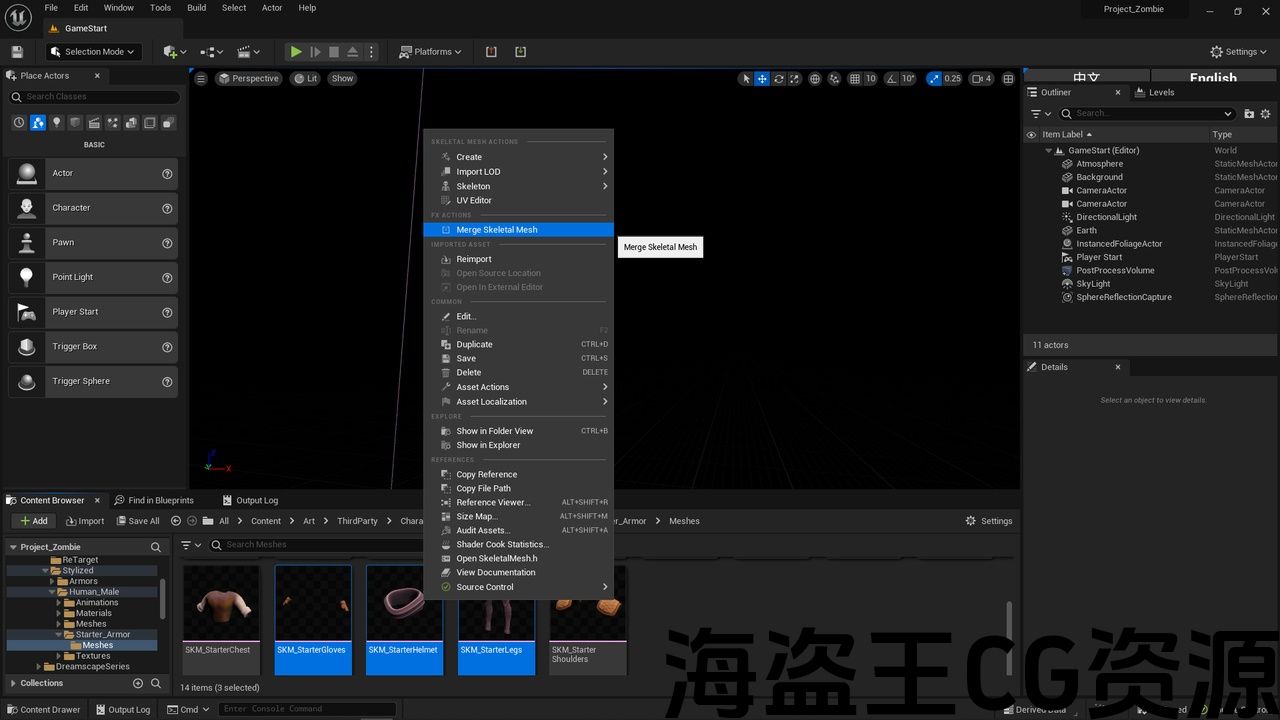
- Merge Skeletal Mesh
Code Modules: (Please include a full list of each Plugin module and their module type (Runtime, Editor etc.))
- QuickMergeSkeletalMesh [Editor]
Number of Blueprints: 0
Number of C++ Classes: 1
Network Replicated: (No)
Supported Development Platforms:(Windows)
Supported Target Build Platforms: (Windows)
Documentation: https://github.com/FoxHoundcn/QuickMergeSkeletalMesh/blob/main/Tutorials.txt
特点:(请包括一个完整的,全面的产品功能列表)
- 合并骨架网格体
代码模块:(请包括每个插件模块及其模块类型(运行时,编辑器等)的完整列表。))
- QuickMergeSkeletalMesh[编辑]
蓝图数目:0
C++类数:1
网络复制:(否)
支持的开发平台:(Windows)
支持的目标构建平台:(Windows)
文件:https://github.com/FoxHoundcn/QuickMergeSkeletalMesh/blob/main/Tutorials.txt
**** Attention ****
How to install to an old engine version Supports all UE5 versions
1.2 Upgrade
Fix LODs
Fix the asset cannot be opened when the editor is opened again
Select skeletal mesh at content, right click mouse button, use Quick Merge Skeletal Mesh, multiple mesh will become one
======= Attention =======
Before purchasing, you can use this test plug-in to check whether the model can be merged normally.
Select skeletal mesh must have the same Skeleton !
Base on the first selected skeletal mesh
Different Skeleton will not be merged !
****注意 ****
如何安装到旧引擎版本 支持所有UE5版本
1.2升级
修复Lod
修复编辑器再次打开时无法打开资源
在内容处选择骨架网格体,单击鼠标右键,使用快速合并骨架网格体,多个网格体将成为一个
========注意========
在购买之前,您可以使用此测试插件检查模型是否可以正常合并。
选择骨架网格体必须具有相同的骨架!
基于第一个选定的骨架网格体
不同的骨架不会合并!
评论(0)