


Features:
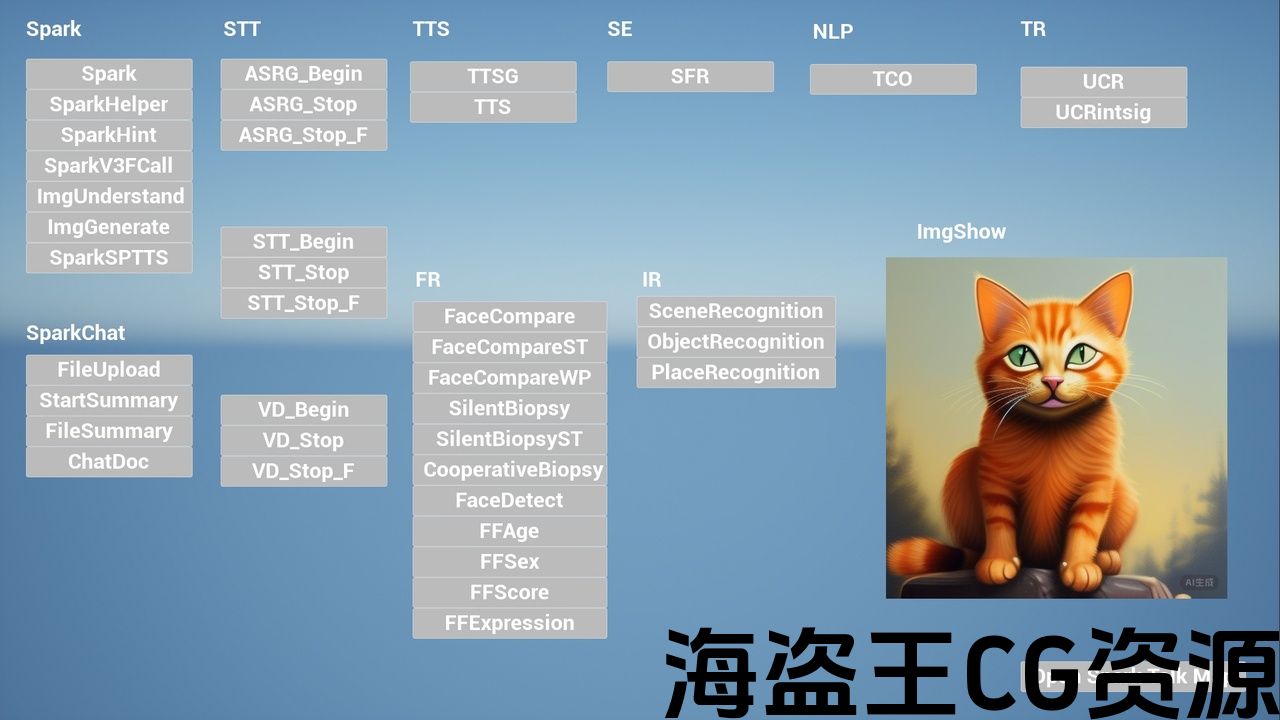
- More than nine main BlueprintMethods are provided to begin and stop Real-Time Speech To Text.
- More than two main BlueprintAsyncNodes are provided to generate voice from text.
- More than six main BlueprintAsyncNodes are provided to communicate with Spark.
- These API are connected with iFlyTek Web API through WebSocket.
- Manny Settings From iFlyTekWeb API are supported.
Code Modules:
- [XGXunFeiBase] [Runtime]
- [XGXunFeiCore] [Runtime]
- [XGXunFeiSTT] [Runtime]
- [XGXunFeiTTS] [Runtime]
- [XGXunFeiASRG] [Runtime]
- [XGXunFeiTTSG] [Runtime]
- [XGXunFeiSpark] [Runtime]
- [XGXunFeiFR] [Runtime]
- [XGXunFeiTR] [Runtime]
- [XGXunFeiIR] [Runtime]
- [XGXunFeiLink] [Runtime]
Number of Blueprints: 0
Number of C++ Classes: 30 (More than)
Network Replicated: No
Supported Development Platforms: Windows
Supported Target Build Platforms: Windows
Documentation: https://github.com/liuhuagang/XGIflytekToUE/blob/main/README.md
特征:
- 提供了九个以上的主要BlueprintMethods来开始和停止实时语音到文本。
- 提供两个以上的主BlueprintAsyncNodes以从文本生成语音。
- 提供了六个以上的主要Blueprintasyncnode与Spark通信。
- 这些API通过WebSocket与科大讯飞Web API连接。
- 支持iFlyTekWeb API的所有设置。
代码模块:
- [XGXunFeiBase][运行时]
- [Xgxunfeicore][运行时]
- [Xgxunfeistt][运行时]
- [XGXunFeiTTS][运行时]
- [Xgxunfeiasrg][运行时]
- [Xgxunfeittsg][运行时]
- [XGXunFeiSpark][运行时]
- [Xgxunfeifr][运行时]
- [Xgxunfeitr][运行时]
- [Xgxunfeir][运行时]
- [XGXunFeiLink][运行时]
蓝图数目:0
C++类数:30(多于)
网络复制:没有
支持的开发平台:Windows
支持的目标构建平台:Windows
文件: https://github.com/liuhuagang/XGIflytekToUE/blob/main/README.md
Hello,the plugin helps you connect to iFlyTek Web API.
CurrentPluginVersion:5.0
已包含科大讯飞WebAPI板块:星火认知大模型,语音识别,语音扩展,人脸识别,文字识别,图像识别,自然语言处理等.
各模块功能可用接口,详见文档,示例工程,视频等.
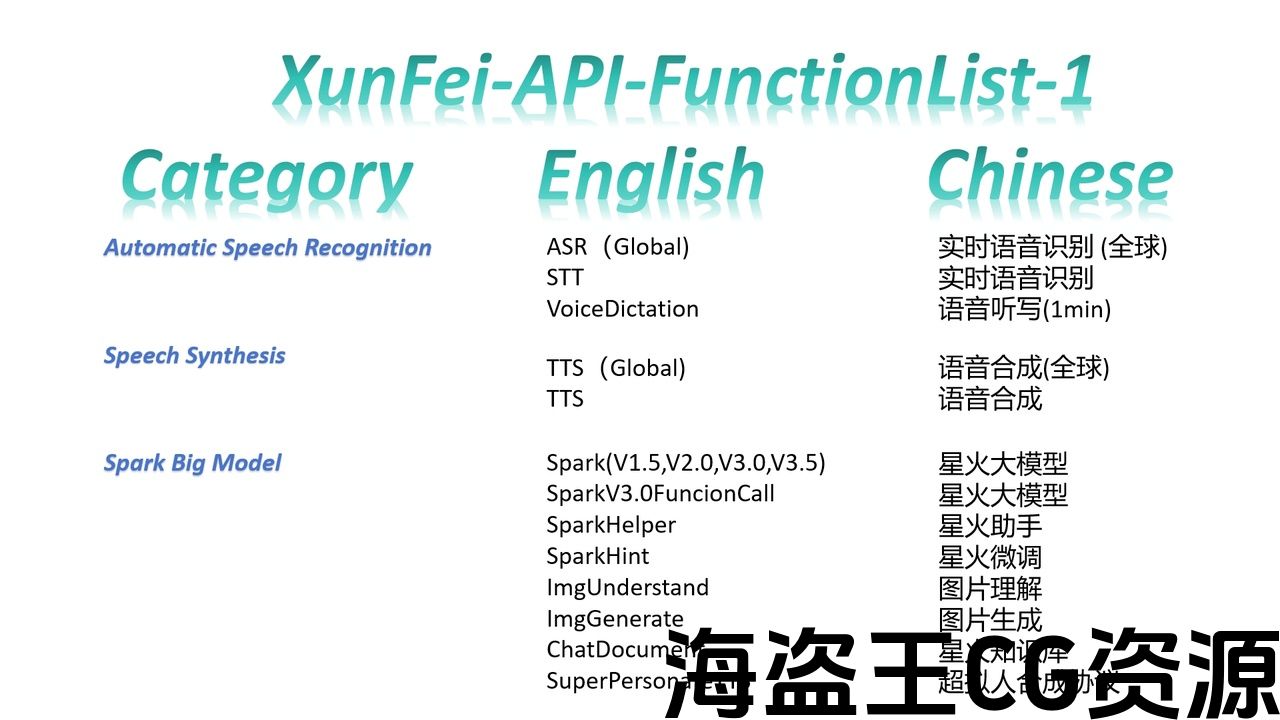
At present,It supports a lot of functions:
Spark Big Model
Automatic Speech Recognition
Speech Synthesis
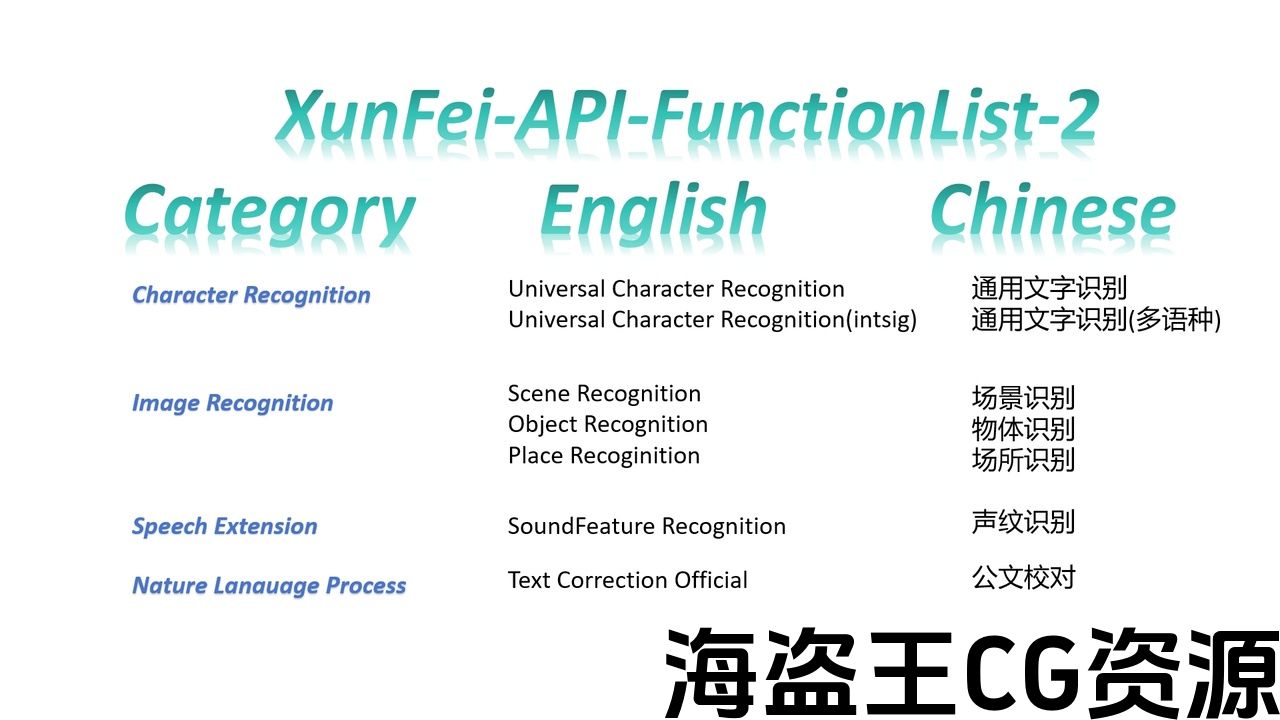
Speech Extension
Face Recognition
Nature Lanauage Process
Character Recognition
Image Recognition
0.Important Things
iFlyTek provides a lot of Web API both in China or in the global region.
This plugin only supports these Web API in right region,when iFlyTek can support these.
Most of Web API seem to be similar.
However,they are really different.You need different accounts,AppID,APIKey,APISecret,especially when you are in China and out of China.
Keep in mind that right App information correspond with right Web API.
Global: ASRG,TTSG;
No Global:Everything else.
1.Get App Information
If you don’t create the iFlyTek App,you should create it.
iFlyTek Web(Chinese site-No Global):
iFlyTek Web(English site-Global):
This plugin supports Global Webp API and No Global Webp API.
Although the code is similar,you have to register your account and manage your App information through different sites.
It is not very difficult to do . You can translate this web page directly through the browser tool.
I have translated some important interface parameters in my codes and documents.
After you created the App, you should enable corresponding function in your iFlyTek control panel,such as STT ,TTS,Spark.
Be careful that some functions are not free.Howover,you can try it for free in a short time.
2.Browse the plugin information From document and UE.
You can quickly learn the functions and documentation for each API
[ProjectSettings/XGPlugins/XGXunFeiLinkCoreSettings]
3.Spark Big Model
You can call XunFeiSpark to begin Spark.
You can communicate with Spark(v1.5,v2.0,v3.0),SparkHelper,SpakHint,SparkV3FunctionCall,ImgUnderstand……
4.Automatic Speech Recognition
You can call XunFeiBeginRealTimeSpeechToText to begin STT.
You can call XunFeiStopRealTimeSpeechToText to end STT.
It captures audio data from audio input device,and then send it to iFLyTek Web API.
It will call you to recive results.
Your defualt audio input device must be in
[{48000 kHz,16 bits, 2 channle},
{48000 kHz,16 bits, 1 channle},
{16000 kHz,16 bits, 1 channle}]
You can keep it default for test at first.
5.Speech Synthesis
You can call XunFeiTextToSpeech to begin TTS.
It is a async blueprint node.
It converts text to USoundWave and wav file.
You have to input the text to convert it.
If you enable bSaveToLocal,you must input the right and absolute file path.
The directory must exist.
The file name must end with “.wav”
You can keep it default for test at first.
6.Face Recognition
You can compare the similarity of two photos of faces.
7.Character Recognition
You can recognize text in multiple languages.
8.Image Recognition.
You can identify scenes, objects, places from pictures.
9.Other
This plugin does not contain any iFlyTek’s files(*.h,*.cpp,*.lib,……)
This plugin does not contain AI code or AI Model code.
This plugin uses “OpenSSL” to encrypt information in the network,but it will not send data to the Creator(“OpenSSL”).
This plugin will not send any data to the plugin author.
This plugin was not developed by iFlyTek.
This plugin will only send the interactive data to iFLyTek and recieve the message from iFlyTek . This plugin will not generate any data directly.You must comply with the relevant user and data usage agreements aboutt iFlyTek.These agreements can be found in the iFLyTek website.
Plugin Video URL(Plugin-v2.4):
Demo Download URL:
The old version part of plugin code was uploaded to GitHub just for learning.
If the plugin is useful for you. Please purchase it in Unreal Engine Marketplace.
Thanks a lot.
您好,该插件帮助您连接到iFlyTek Webapi.
当前版本:5.0
已包含科大讯飞WebAPI板块:星火认知大模型,语音识别,语音扩展,人脸识别,文字识别,等,自然语言处理等.
各模块功能可用接口,详见文档,示例工程,视频等.
目前,它支持很多功能:
火花大模型
自动语音识别
语音合成
演讲扩展
人脸识别
自然Lanauage过程
字符识别
图像识别
0.重要的事情
科大讯飞在中国或全球地区都提供了大量的Web API。
这个插件只支持这些Web API在正确的区域,当iFlyTek可以支持这些.
大多数Web API似乎都是相似的。
然而,他们真的不同。您需要不同的帐户,AppID,APIKey,APISecret,特别是当您在中国和国外时。
请记住,正确的应用程序信息与正确的Web API相对应。
全球:ASRG,TTSG;
没有全球:其他一切。
1.获取应用程序信息
如果你不创建iFlyTek应用程序,你应该创建它。
iFlyTek网站(中文网站-无全球):
iFlyTek网站(英文网站-全球):
此插件支持全局Webp API,不支持全局Webp API。
虽然代码相似,但您必须注册您的帐户并通过不同的网站管理您的应用程序信息。
这并不是很难做到。 您可以直接通过浏览器工具翻译此网页。
我已经在我的代码和文档中翻译了一些重要的接口参数。
创建应用程序后,您应该在iFlyTek控制面板中启用相应的功能,如STT、TTS、Spark。
注意某些功能不是免费的。Howover,您可以在短时间内免费试用。
2.从document和UE浏览插件信息。
您可以快速了解每个API的功能和文档
[ProjectSettings/XGPlugins/XGXunFeiLinkCoreSettings]
3.火花大模型
您可以致电XunFeiSpark开始Spark。
您可以与Spark(v1.5,v2.0,v3.0),SparkHelper,SpakHint,SparkV3FunctionCall,ImgUnderstand进行通信。…..
4.自动语音识别
您可以调用XunFeiBeginRealTimeSpeechToText开始STT。
您可以调用XunFeiStopRealTimeSpeechToText来结束STT。
它从音频输入设备捕获音频数据,然后将其发送到iflytekweb API。
它会打电话给你recive结果。
您的defualt音频输入设备必须在
[{48000khz,16位,2信道},
{48000khz,16位,1信道},
{16000khz,16位,1信道}]
您可以在第一次将其保留为默认值进行测试。
5.语音合成
您可以致电XunFeiTextToSpeech开始TTS。
它是一个异步蓝图节点。
它将文本转换为USoundWave和wav文件。
您必须输入文本才能转换它。
如果启用bSaveToLocal,则必须输入正确和绝对文件路径。
目录必须存在。
文件名必须以”结尾。波”
您可以在第一次将其保留为默认值进行测试。
6.人脸识别
您可以比较面部的两张照片的相似性。
7.字符识别
您可以识别多种语言的文本。
8.图像识别。
您可以从图片中识别场景,物体,地点。
9.其他
此插件不包含任何科大讯飞的文件(*.h,*.cpp,*。lib,。…..)
此插件不包含AI代码或AI模型代码。
这个插件使用”OpenSSL”来加密网络中的信息,但它不会将数据发送给创建者(”OpenSSL”)。
此插件不会向插件作者发送任何数据。
这个插件不是iFlyTek开发的。
这个插件只会发送交互数据到iFLyTek和接收iFlyTek的消息。 此插件不会直接生成任何数据。您必须遵守科大讯飞相关的用户和数据使用协议。这些协议可以在iFLyTek网站上找到。
插件视频URL(插件-v2.4):
演示下载URL:
插件代码的旧版本部分被上传到GitHub只是为了学习。
如果插件对您有用。 请在虚幻引擎商城购买。
非常感谢!.
评论(0)