
Features:
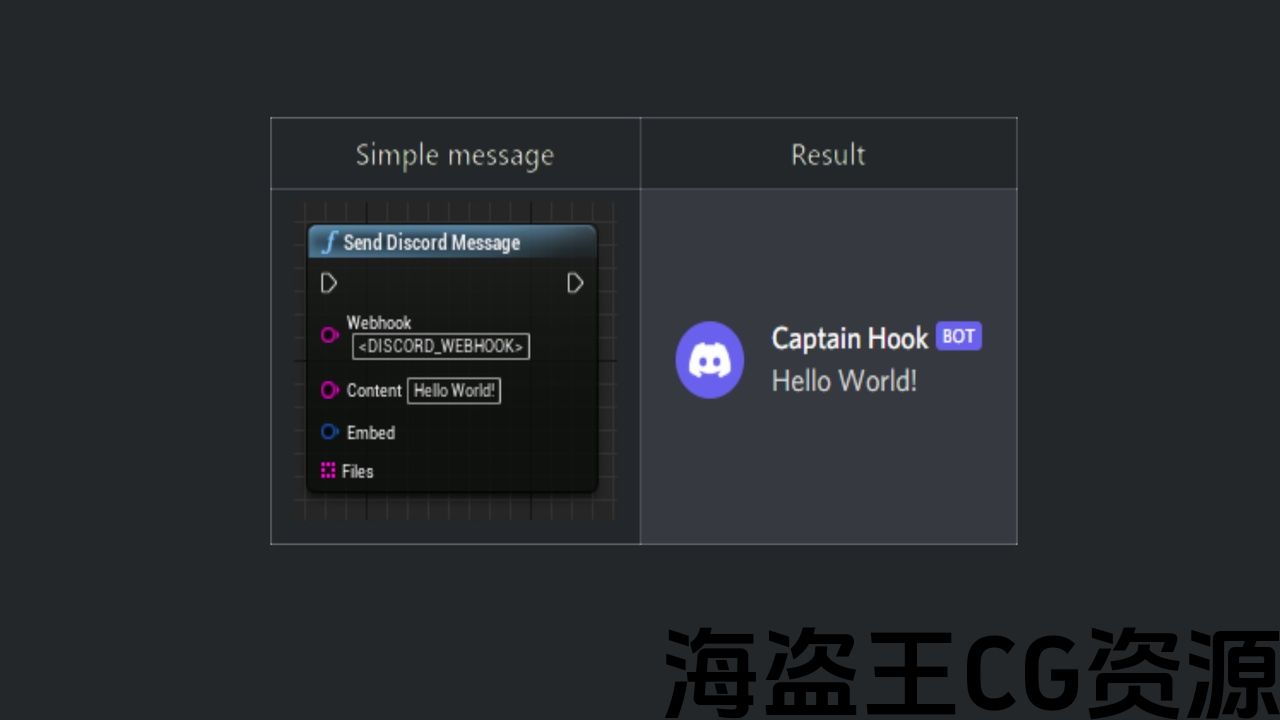
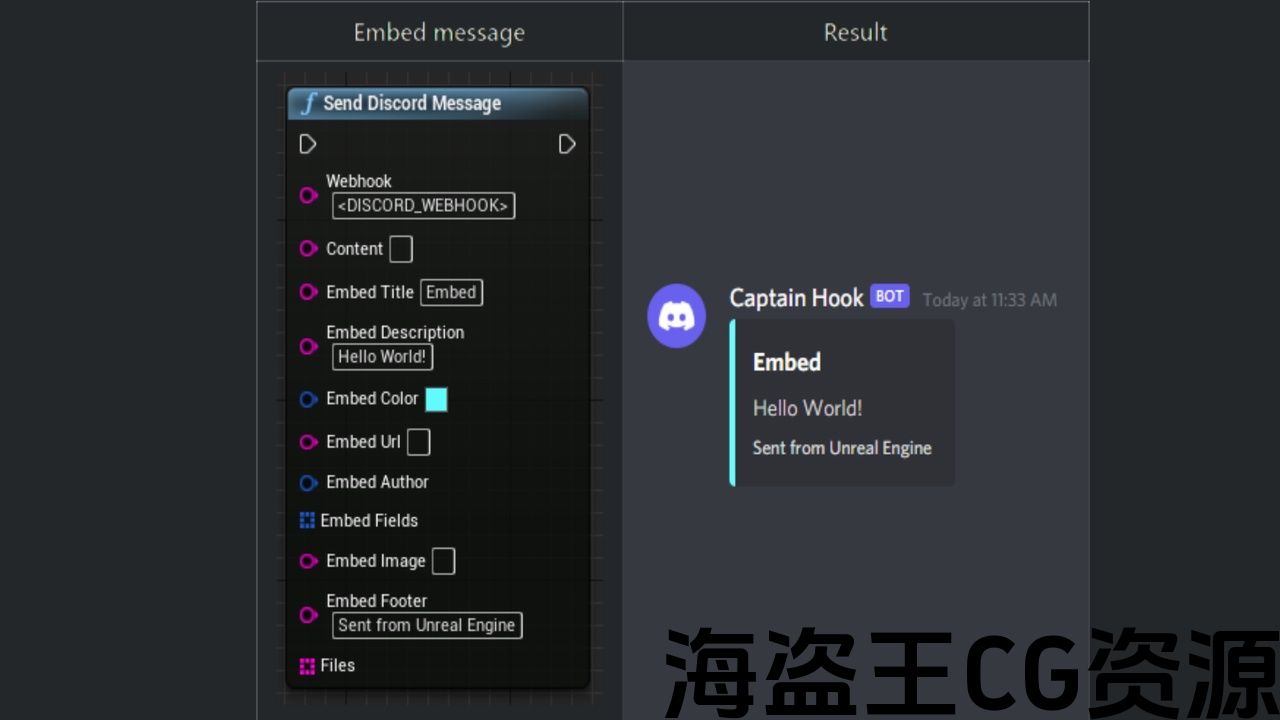
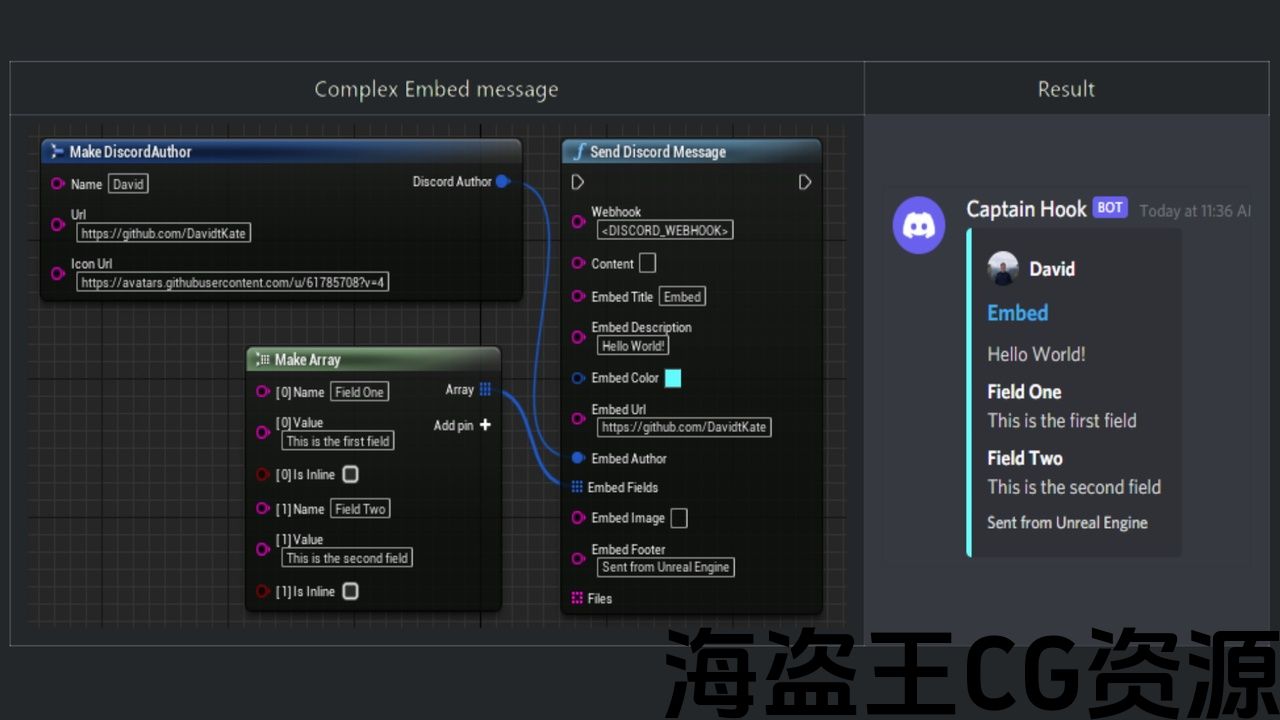
- Send automated messages, embeds and/or files to Discord using the flexible SendDiscordMessage blueprint function
- Supports sending files of type: .png, .jpg, .gif, .txt and .mp4
- Can be called in any blueprint
Code Modules:
- DiscordMessenger [Runtime]
Number of Blueprints: 0
Number of C++ Classes: 2
Supported Development Platforms: Windows, Mac, Linux, Android, IOS
Supported Target Build Platforms: Windows, Mac, Linux, Android, IOS
Documentation:
- Post-UE4.27: https://docs.google.com/document/d/1q2KXQiDCMoY5KcidiuSvI4i_o0K3wpLOM9PgFWdSvh4/edit?usp=sharing
- Pre-UE4.27: https://docs.google.com/document/d/1UMT_zgP61_wqZhtAWcjBnn_O7p8_PqYlWNUZOvqU-Ys/edit?usp=sharing
Important/Additional Notes:
- Discord’s upload limit for files is max 8MB
- You cannot include more than 10 files in one HTTP Request
- Supported file types are: .png, .jpg, .gif, .txt and .mp4 (Additional file types can be added by modifying source code)
- Embed image requires the file name of one of the included files. You cannot have more than one embed image in a single embed
- Atleast one of these arguments must contain data: “Content”, “Embed” and/or “Files”
特征:
- 使用灵活的SendDiscordMessage蓝图函数将自动消息、嵌入和/或文件发送到Discord
- 支持发送类型为:的文件。png,。jpg,。gif,。txt和.mp4
- 可以在任何蓝图中调用
代码模块:
- 不和谐者[运行时]
蓝图数目:0
C++类数:2
支持的开发平台:Windows、Mac、Linux、Android、IOS
支持的目标构建平台:Windows,Mac,Linux,Android,IOS
文件:
- 后UE4.27: https://docs.google.com/document/d/1q2KXQiDCMoY5KcidiuSvI4i_o0K3wpLOM9PgFWdSvh4/edit?usp=sharing
- 预UE4.27: https://docs.google.com/document/d/1UMT_zgP61_wqZhtAWcjBnn_O7p8_PqYlWNUZOvqU-Ys/edit?usp=sharing
重要/附加注意事项:
- Discord的文件上传限制为最大8MB
- 一个HTTP请求中不能包含超过10个文件
- 支持的文件类型有:.png,。jpg,。gif,。txt和.mp4(可以通过修改源代码添加其他文件类型)
- 嵌入图像需要其中一个包含文件的文件名。 在单个嵌入中不能有多个嵌入图像
- 至少其中一个参数必须包含数据:”内容”、”嵌入”和/或”文件”

UPDATE 07/04/2022: Added UE5.0 Support!
UPDATE 03/09/2021: Here are the latest patch notes for UE4.27:
- Removed “IncludeEmbed” argument as Discord Messenger now figures out internally if an embed was attached or not
- Embed color can now be defined directly from a color picker window in the graph editor. No more need for manual hex to decimal conversion.
- Improved error handling and logging
- Added tooltip comments
- Reduced function-call overhead
- Updated documentation
How to Use
- Setup a Discord webhook (https://support.discord.com/hc/en-us/articles/228383668-Intro-to-Webhooks)
- Call SendDiscordMessage from DiscordMessenger in any blueprint
- Set webhook URL and fill in atleast one of these arguments: “Content”, “Embed” and/or “Files”
更新07/04/2022: 新增UE5.0支持!
更新03/09/2021: 以下是UE4.27的最新补丁说明:
- 删除”IncludeEmbed”参数作为Discord Messenger现在在内部确定是否附加了嵌入
- 现在可以直接从图形编辑器中的颜色选择器窗口定义嵌入颜色。 不再需要手动十六进制到十进制转换。
- 改进了错误处理和日志记录
- 添加了工具提示注释
- 减少函数调用开销
- 更新的文档
如何使用
- 设置一个不和谐的webhook(https://support.discord.com/hc/en-us/articles/228383668-Intro-to-Webhooks)
- 在任何蓝图中从DiscordMessenger调用SendDiscordMessage
- 设置webhook URL并填写以下参数中的至少一个:”内容”,”嵌入”和/或”文件”
声明:本站所有资源都是由站长从网络上收集而来,如若本站内容侵犯了原著者的合法权益,可联系站长删除。
评论(0)