
Key Features:
-
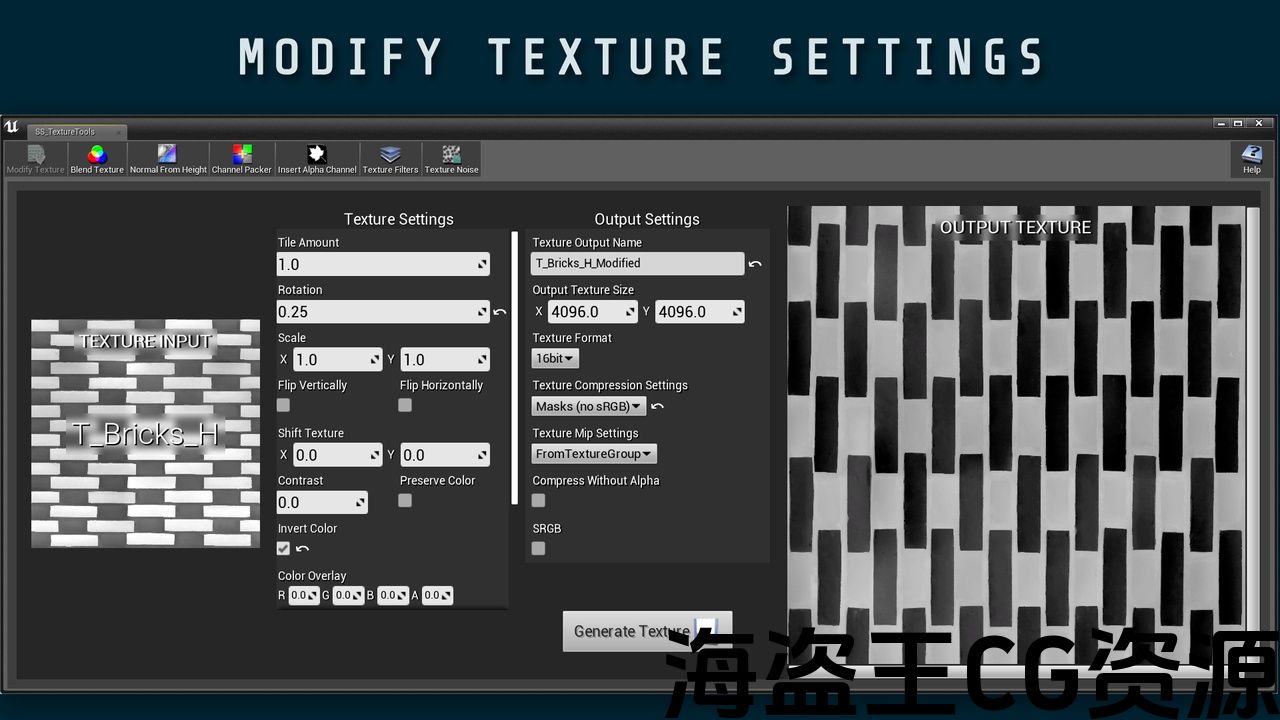
Modify Texture (Tile, rotate, scale, slip, shift UV, modify color and opacity)
-
Blend Texture: (Similar to the blending settings in standard photo editing software)
-
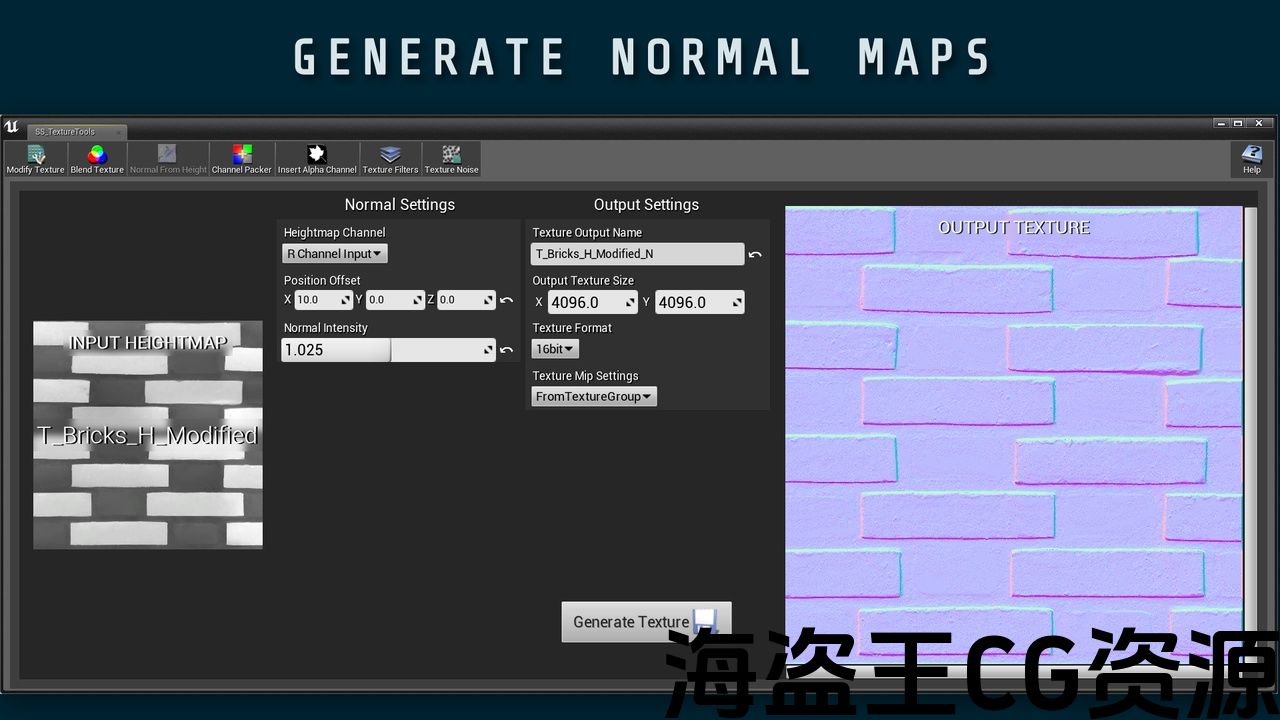
Normal From Height: (Generate normals from your height maps or diffuse maps)
-
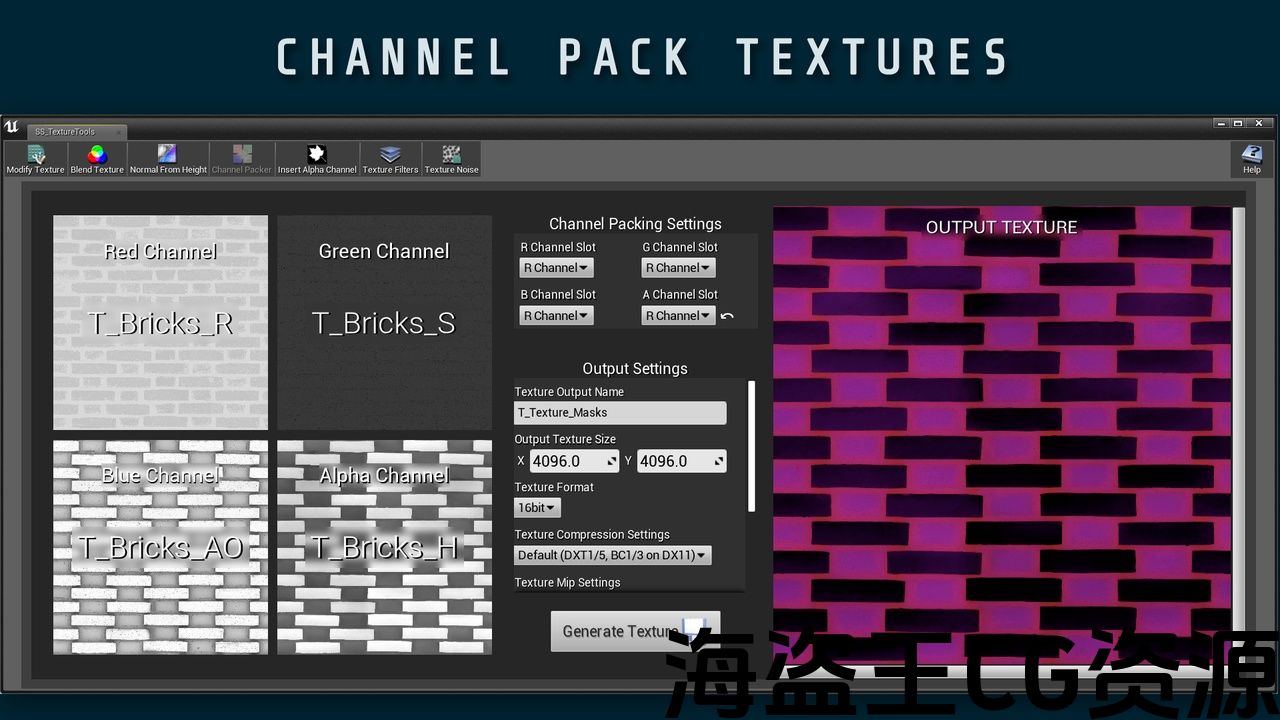
Channel Packer: (Pack your mask textures into one singular texture)
-
Insert Alpha Mask: (Quickly insert an alpha mask into your texture)
-
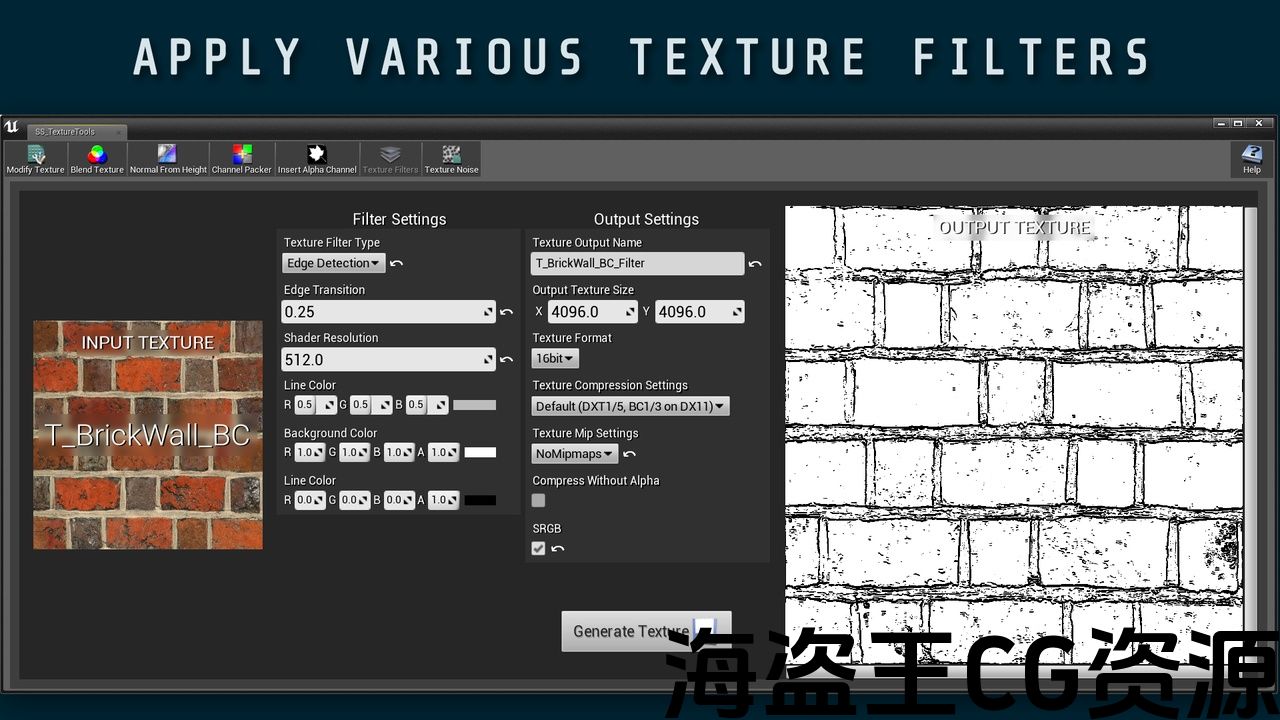
Texture Filters: (Similar to the filter settings in standard photo editing software)
-
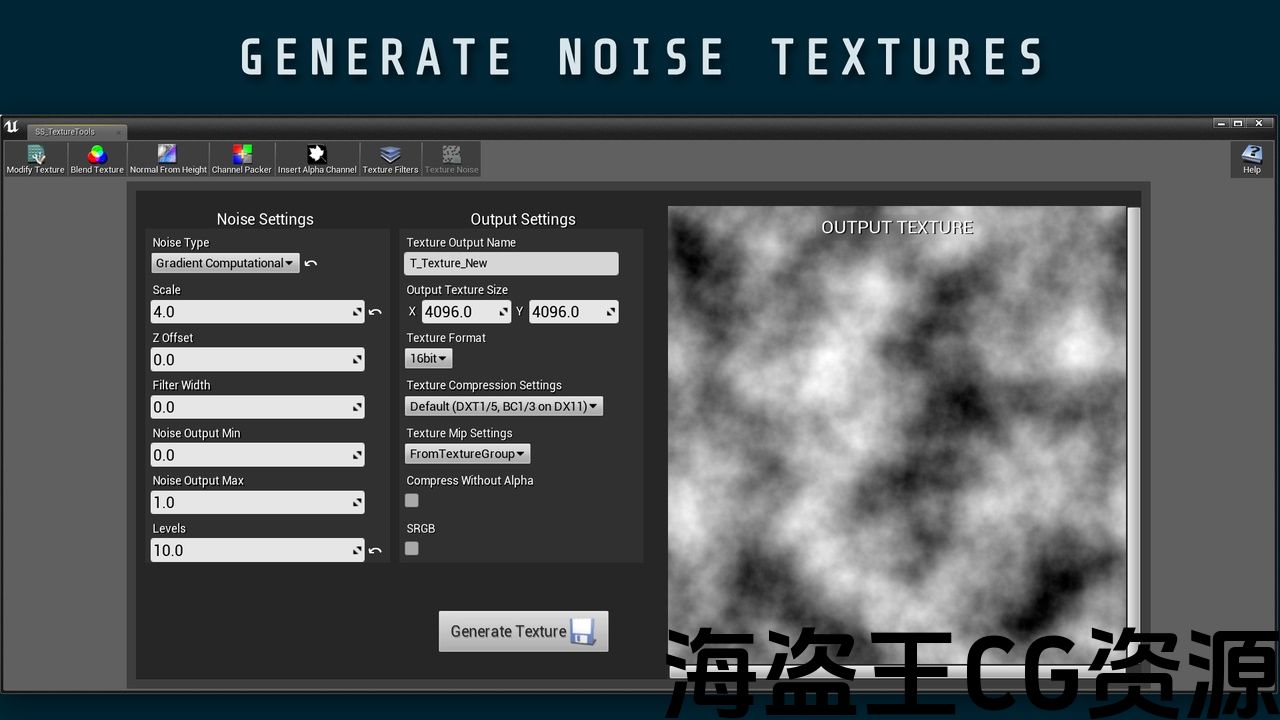
Texture Noise: (Ability to generate Noise Textures)
Code Modules: Texture Tools Module, Editor Only
主要特点:
-
修改纹理(平铺,旋转,缩放,滑动,移位UV,修改颜色和不透明度)
-
混合纹理:(类似于标准照片编辑软件中的混合设置)
-
从高度法线:(从高度图或漫射图生成法线)
-
通道打包器:(将你的蒙版纹理打包成一个单一的纹理)
-
插入Alpha蒙版:(快速将alpha蒙版插入纹理)
-
纹理滤镜:(类似于标准照片编辑软件中的滤镜设置)
-
纹理噪声:(生成噪声纹理的能力)
代码模块: 纹理工具模块,仅限编辑器
The SHADERSOURCE – Texture Tools plugin provides 7 tools for texture modification to reduce the need to hop between Unreal Engine and 2D graphics editors such as Photoshop. The tools provided are:
Modify Texture | Blend Texture | Normal From Height | Channel Packer | Insert Alpha Mask | Texture Filters | Texture Noise
A lot of these tools are common needs for creating materials, especially for landscapes. See the information below for more detailed descriptions.
Other related SHADERSOURCE assets:
See all SHADERSOURCE products here.
Follow SHADERSOURCE on socials: YouTube | Rumble | Instagram | Twitter | LinkedIn | ArtStation
Modify Texture:
-
Tile your textures
-
Rotate, Scale
-
Flip Vertically, Horizontally
-
Shift Texture UV
-
Contrast, with preserve color
-
Invert Color, Color Overlay
-
Opacity Power, Multiply and Floor
Blend Texture: (Similar to the blending settings in standard photo editing software)
-
Blend Types (Add, Multiply, Divide, Overlay, Angle Corrected Normals, Color Burn, Color Dodge, Darken, Difference, Exclusion, Hard Light, Lighten, Linear Burn, Linear Dodge, Linear Light, Pin Light, Screen, Soft Light.
Normal From Height: (Generate normals from your height maps or diffuse maps)
-
Select which RGBA channel to convert to a normal map
-
UV Offset, Normal Strength
Channel Packer: (Pack your mask textures into one singular texture)
-
Full functioning texture packer with RGBA input slots
-
Choose which RGBA channel to input per texture
Insert Alpha Mask:
-
Quickly insert an alpha mask into your texture
Texture Filters: (Similar to the filter settings in standard photo editing software)
-
9 Filters included: Simple Blur, Spiral Blur, Motion Blur, Chromatic Shift, Sharpen, Pixelate, Edge Detection, Toon, Toon with Edge Detection
Texture Noise: (Ability to generate Noise Textures)
-
6 Noise generators included: Simplex, Gradient Texture, Fast Gradient Texture, Gradient Computational, Value, Voronoi
-
Can change Scale, Z offset, Filter Width, Noise Output Min/Max, Levels, and Quality for Voronoi
SHADERSOURCE-Texture Tools插件提供了7种用于纹理修改的工具,以减少在虚幻引擎和Photoshop等2d图形编辑器之间跳转的需要。 提供的工具是:
修改纹理 | 混合纹理 | 从高处正常 | 通道封隔器 | 插入Alpha蒙版 | 纹理过滤器 | 纹理噪声
许多这些工具都是创建材质的常见需求,特别是地形。 有关更详细的描述,请参阅下面的信息。
其他相关SHADERSOURCE资源:
查看所有SHADERSOURCE产品 这里.
在社交上关注SHADERSOURCE: YouTube的 | 隆隆隆隆 | Instagram | 推特 | 领英 | 艺术站
修改纹理:
-
平铺纹理
-
旋转,缩放
-
垂直翻转,水平翻转
-
移位纹理UV
-
对比,保留颜色
-
反转颜色,颜色叠加
-
不透明度功率,乘法和地板
混合纹理:(类似于标准照片编辑软件中的混合设置)
-
混合类型(添加,乘法,除法,叠加,角度校正法线,颜色燃烧,颜色减淡,变暗,差异,排除,硬光,减亮,线性燃烧,线性减淡,线性光,针光,屏幕,软光。
从高度法线:(从高度图或漫射图生成法线)
-
选择要转换为法线贴图的RGBA通道
-
UV偏移,正常强度
通道打包器:(将你的蒙版纹理打包成一个单一的纹理)
-
具有RGBA输入插槽的全功能纹理打包器
-
选择每个纹理要输入的RGBA通道
插入Alpha蒙版:
-
快速将alpha蒙版插入纹理
纹理滤镜:(类似于标准照片编辑软件中的滤镜设置)
-
包括9个滤镜:简单模糊,螺旋模糊,运动模糊,色移,锐化,像素化,边缘检测,香椿,香椿与边缘检测
纹理噪声:(生成噪声纹理的能力)
-
6噪声发生器包括:单纯形,梯度纹理,快速梯度纹理,梯度计算,值,Voronoi
-
可以更改Voronoi的比例、Z偏移、滤波器宽度、噪声输出最小/最大值、电平和质量
评论(0)