



Engine Compatibility: UE 5.4+
Platform Support: Windows (64-bit), Mac (Editor only)
No Plugins Required
No External Dependencies
Number of Blueprints: 6
Number of Editor Utility Widgets: 10
Network Replicated: No
Supported Development Platforms:
Features
Calibration & Time of Day
• Chrome sphere + color calibrator spawning in view
• Calibrator alignment (Z-axis or XYZ)
• Time presets: Morning, Lunch, Afternoon, Evening, Night
• 24-hour slider + manual input
• Auto-locate directional light
Emissive & Transparency
• Apply translucent/opaque emissive materials
• Adjust: Color, Emissive Strength, Fresnel, Opacity
• Pulse effects (3 styles), flicker toggle, WPO control
• Attach Spot, Point, or Rect lights
• “Simply Transparent” setup + advanced controls
Post Process Toolkit
• Save settings to 10 UI slots
• Export/import post process data
• Apply templates or spawn volumes
• Built-in styles: Cinematic, Neutral, Stylized, Horror, Sci-fi
• Preview parameters before committing
• Does not support: Convolution Kernel, Exposure Curves, Metering Mask, Dirk Tint, Height/Shadow Curves, BokehShape, LUTs, Cubemaps, Film Grain, External Data Layer
GOBO System
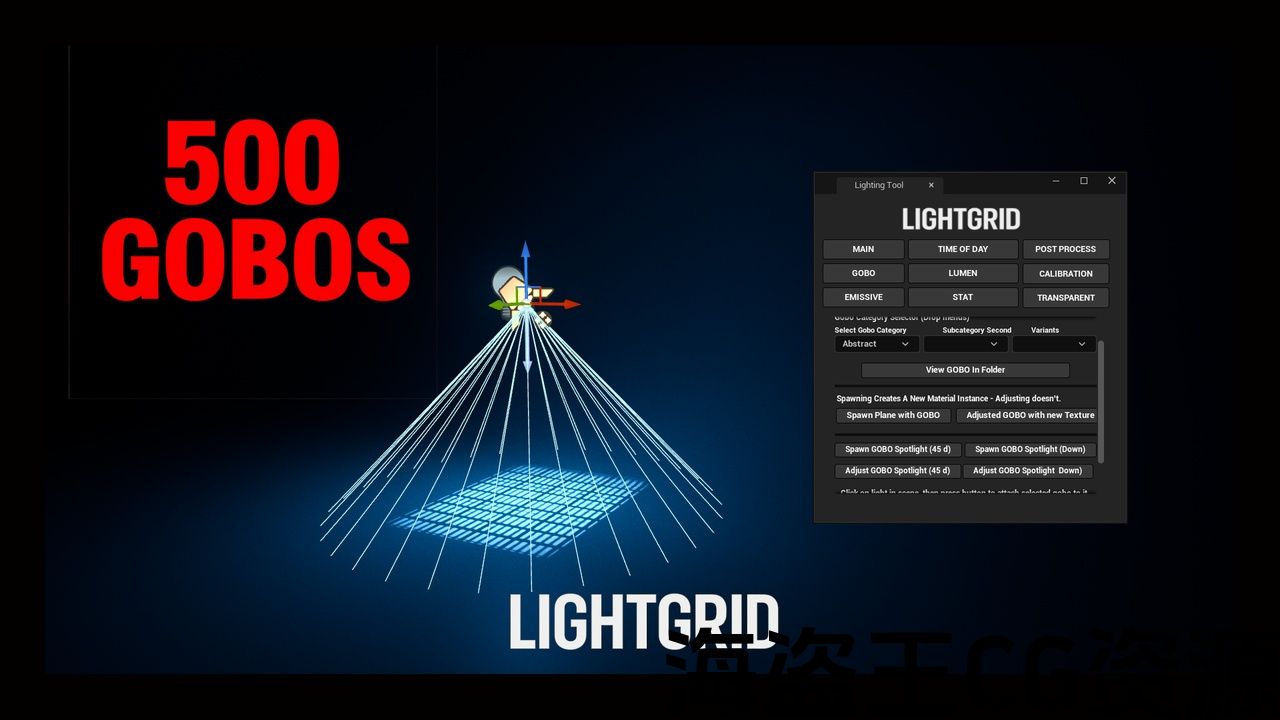
• 500+ gobos (searchable/sortable)
• Spawn planes/lights with gobos attached
• Adjust gobos in-scene or attach to any light
Debug & Lighting Tools
• Stat overlays, Lumen volume, dual spotlight setup
• Lighting channels (multi-select), DOF quality toggle
• VisualizeHDR histogram, foliage shadow control
• VolumetricFog.GridPixelSize access
Documentation: Video link shows usage. GOBO video shows how to open the tool.
引擎兼容性:UE 5.4+
平台支持:Windows(64 位)、Mac(仅限编辑器)
无需插件
无外部依赖项
蓝图数量:6
编辑器实用程序小部件数量:10
网络复制:否
支持的开发平台:
功能
校准和时间
• Chrome 球体 + 颜色校准器在视图中生成
• 校准器对齐(Z 轴或 XYZ)
• 时间预设:早上、午餐、下午、晚上、夜间
• 24 小时滑块 + 手动输入
•自动定位定向光
发射和透明度
• 应用半透明/不透明发射材料
• 调整:颜色、发射强度、菲涅耳、不透明度
• 脉冲效果(3 种样式)、闪烁切换、WPO 控制
• 连接聚光灯、点光源或矩形光源
• “简单透明”设置 + 高级控件
后期处理工具包
• 将设置保存到10 个UI 插槽
• 导出/导入后期处理数据
• 应用模板或生成体积
• 内置样式:电影、中性、风格化、恐怖、科幻
• 提交前预览参数
• 不支持:卷积核、曝光曲线、测光遮罩、Dirk Tint、高度/阴影曲线、BokehShape、LUT、立方体贴图、胶片颗粒、外部数据层
GOBO 系统
• 500 多个图案片(可搜索/可排序)
• 生成带有图案片的平面/灯光
• 在场景中调整图案片或附加到任何灯光
调试和照明工具
• 统计叠加、流明体积、双聚光灯设置
• 照明通道(多选)、DOF 质量切换
• VisualizeHDR 直方图、树叶阴影控制
• VolumetricFog.GridPixelSize 访问
文档:视频链接显示用法。 GOBO 视频展示了如何打开该工具。
Video Example
LIGHTGRID
https://youtu.be/iXFS1bMZm0o?si=K9YMB5viWbfLsPHf
https://youtu.be/bnOEide1Pnw?si=wxhOIv0Hk-RPON67
https://youtu.be/CqR76VLK_co?si=bNaund57_zZCU64q
https://youtu.be/T0x7bO_MLNQ?si=tsICNwRw-MPjnPT2
https://youtu.be/T0x7bO_MLNQ?si=tsICNwRw-MPjnPT2
https://youtu.be/T0x7bO_MLNQ?si=tsICNwRw-MPjnPT2
https://youtu.be/e1G0sZ9W9rc?si=W_qELodEuPed3EiG
LightGrid is a modular lighting and post process toolkit for Unreal Engine, built for fast iteration and cinematic control.
Spawn chrome spheres, apply emissive effects, switch post process styles, and deploy over 500 gobos—all with intuitive, in-scene controls. Perfect for prototyping, grading, and stylized lighting setups.
视频示例
LIGHTGRID
https://youtu.be/iXFS1bMZm0o?si=K9YMB5viWbfLsPHf
https://youtu.be/bnOEide1Pnw?si=wxhOIv0Hk-RPON67
https://youtu.be/CqR76VLK_co?si=bNaund57_zZCU64q
https://youtu.be/T0x7bO_MLNQ?si=tsICNwRw-MPjnPT2
https://youtu.be/T0x7bO_MLNQ?si=tsICNwRw-MPjnPT2
https://youtu.be/T0x7bO_MLNQ?si=tsICNwRw-MPjnPT2
https://youtu.be/e1G0sZ9W9rc?si=W_qELodEuPed3EiG
LightGrid 是虚幻引擎的模块化照明和后期处理工具包,专为快速迭代和电影控制而构建。
生成镀铬球体、应用发射效果、切换后期处理样式并部署超过 500 个图案片——全部带有直观的场景控制。非常适合原型制作、分级和风格化照明设置。
评论(0)