
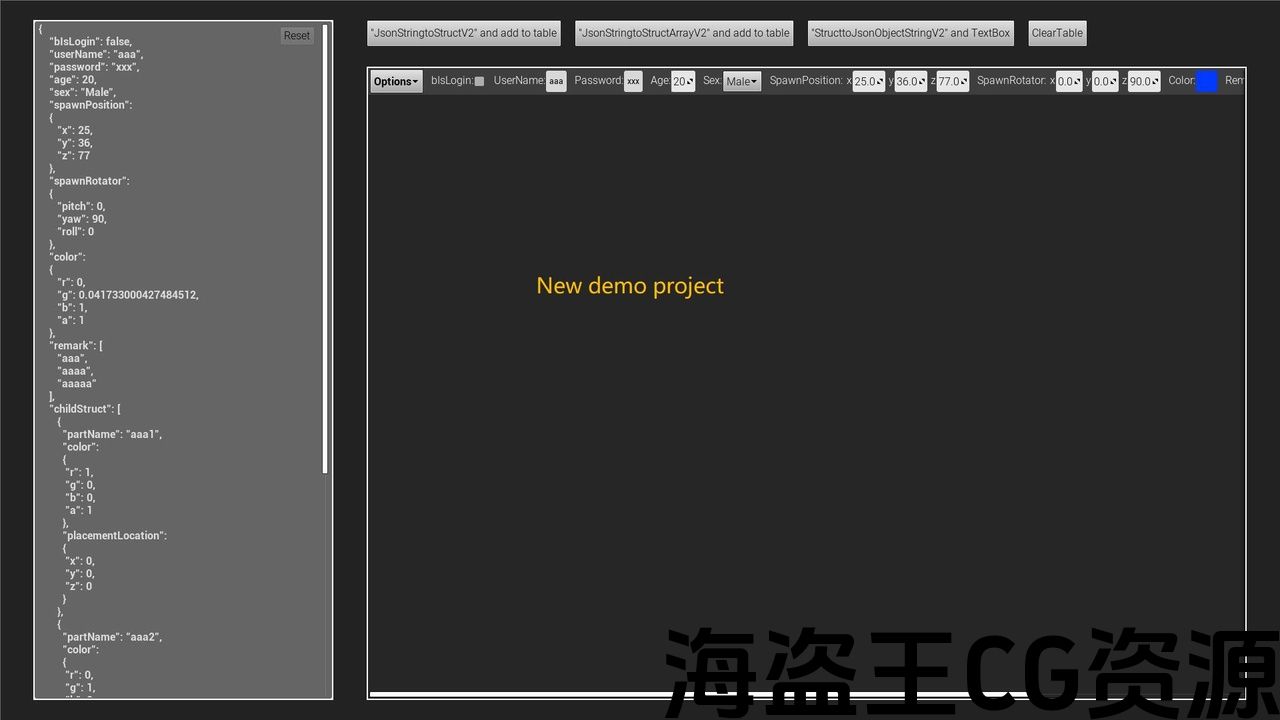
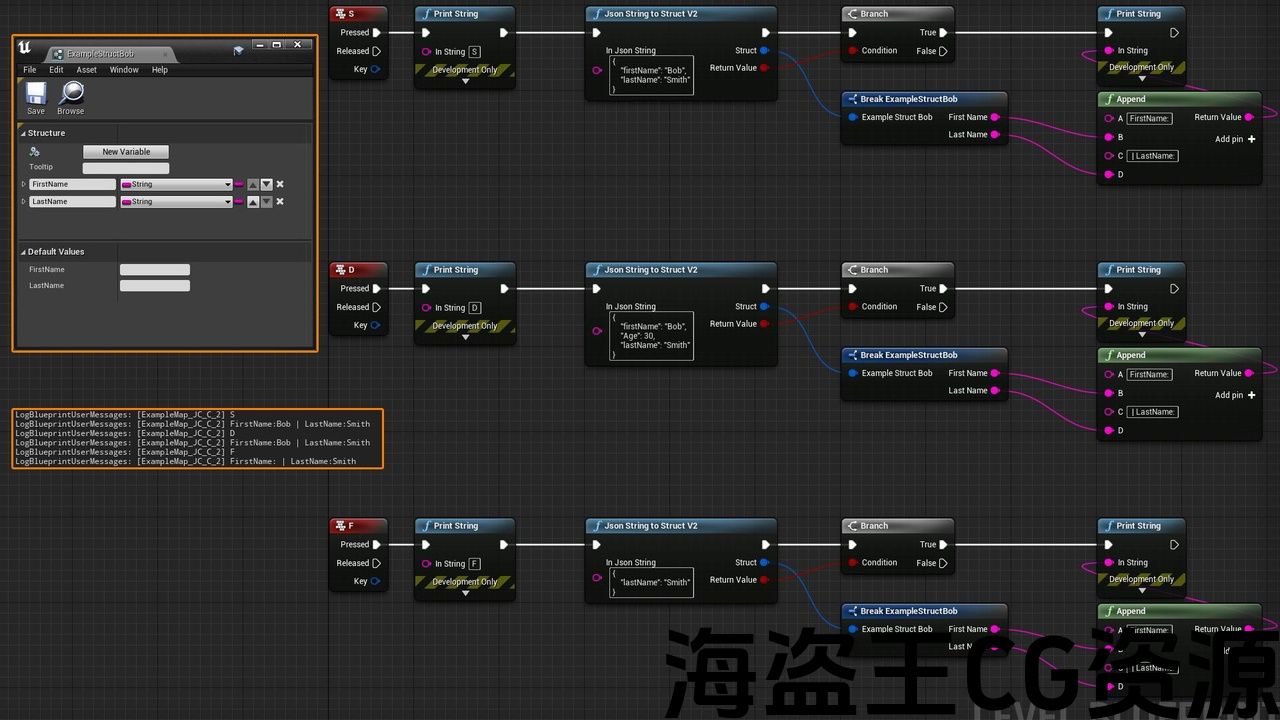
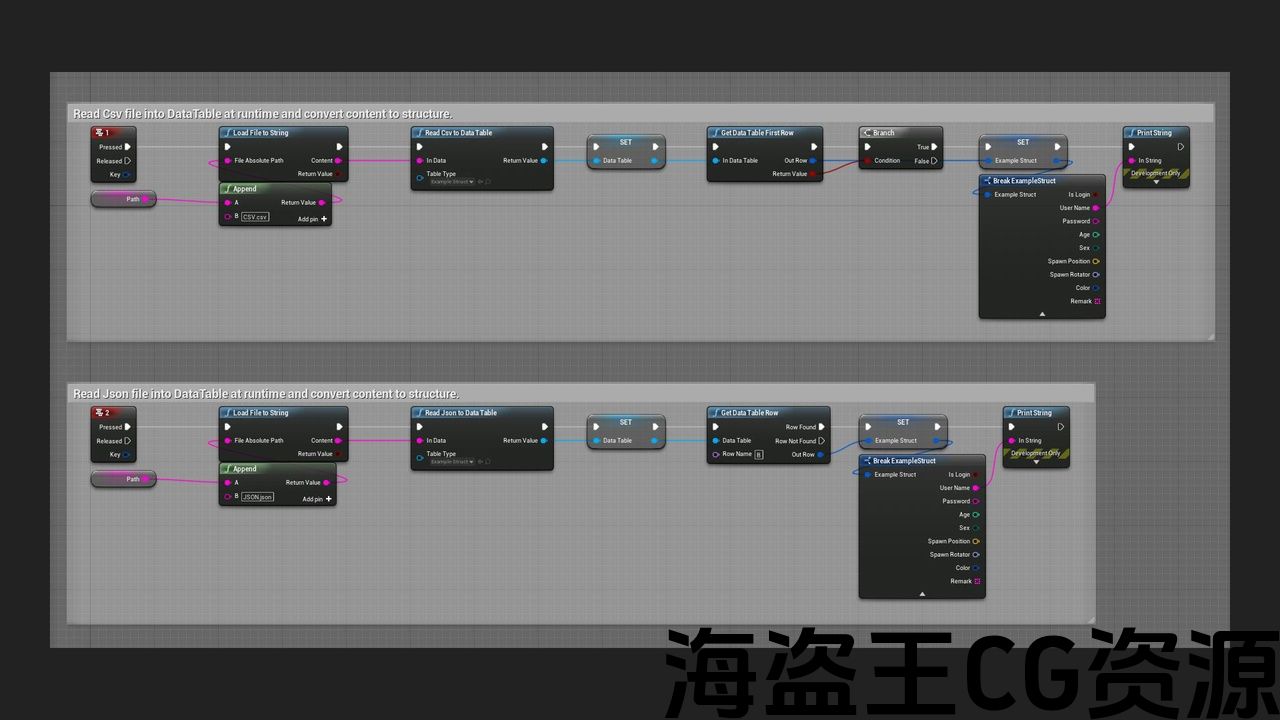
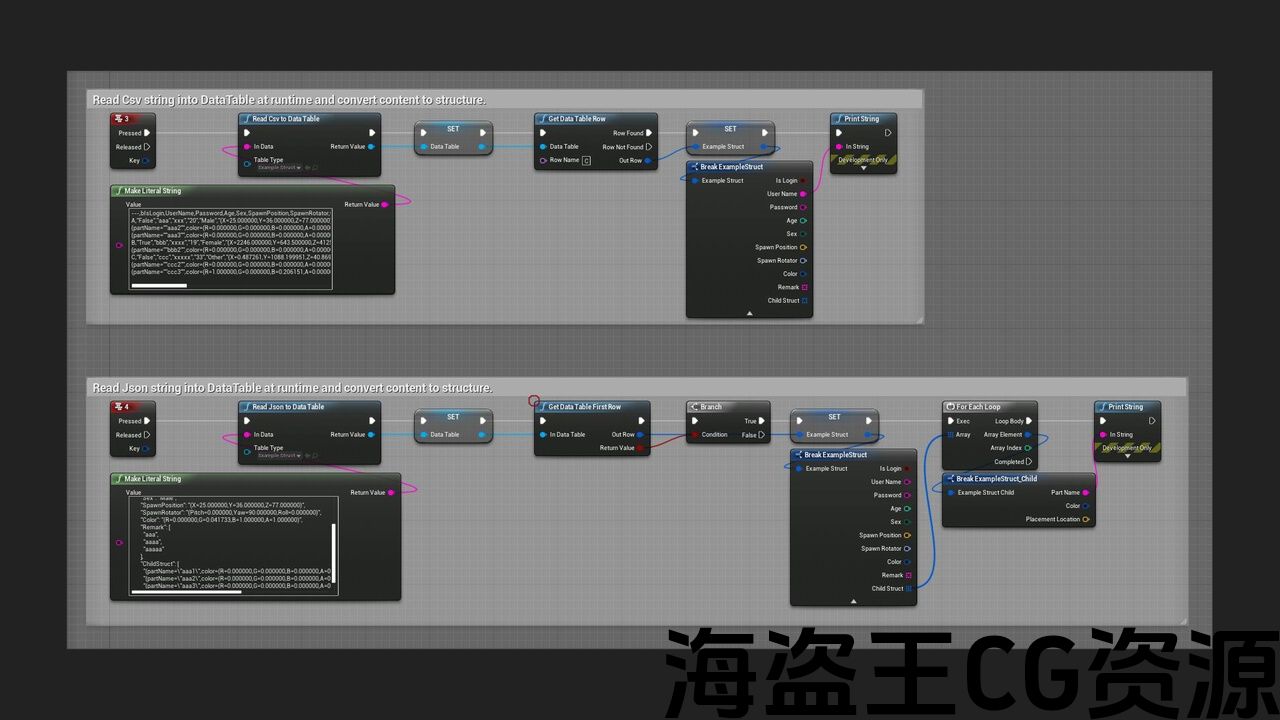
Features:
- Parse JSON or CSV string into a DataTable
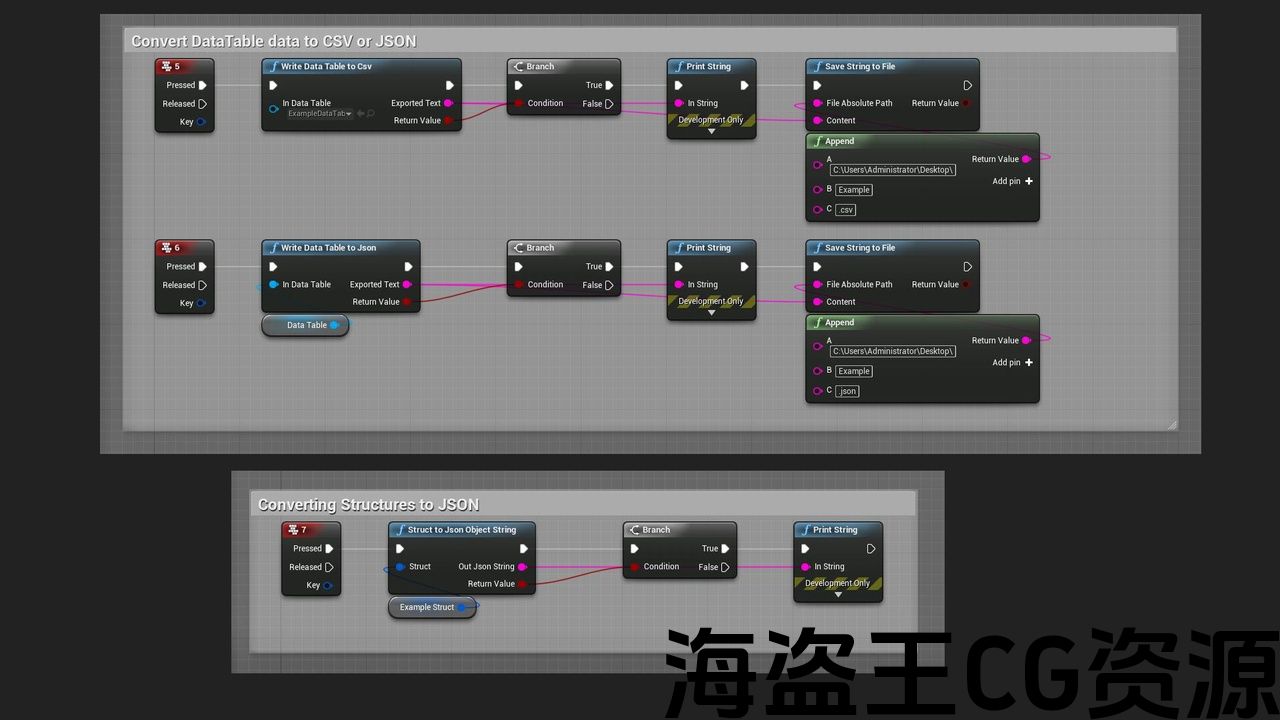
- Parse DataTable into JSON or CSV string
- Parse struct into a JSON string
- Parse JSON string into a struct
- Read file as string
Code Modules:
- JsonCsvToDataTableToStruct (Runtime)
Check out ywt20’s other products here : https://www.unrealengine.com/marketplace/en-US/profile/YWT20
Number of C++ Classes:1
Network Replicated: (No)
Supported Development Platforms: (“Windows”,“Mac”)
Supported Target Build Platforms: ( “Win64”, “Mac”, “Linux”)
note:In theory it should work on all platforms, but I have no equipment to test it, if you have problems using it, please let me know.
Example Project: Link
Documentation: Link
功能:
- 将 JSON 或 CSV 字符串解析为 DataTable
- 将 DataTable 解析为 JSON 或 CSV 字符串
- 将结构解析为 JSON 字符串
- 将 JSON 字符串解析为结构
- 将文件作为字符串读取
代码模块:
- JsonCsvToDataTableToStruct(运行时)
在此处查看 ywt20 的其他产品:https://www.unrealengine.com/marketplace/en-US/profile/YWT20
C++ 类数量:1
网络复制:(否)
支持的开发平台:(“Windows”、“Mac”)
支持目标构建平台:(“Win64”、“Mac”、“Linux”)
注意:理论上它应该适用于所有平台,但我没有设备来测试它,如果您使用时遇到问题,请告诉我。
示例项目:链接
文档:链接
Get a Json or CSV string from a file or network or anywhere, read it into a DataTable at runtime, and then convert the content into a matching structure.The values in the structure can be all data types supported by the Unreal system.
V3 adds full XML/INI/JSON support, upgrading JSON/CSV-to-DataTable/Struct workflows with data retrieval, struct/array conversion, path parsing, and type fault tolerance.
-
XML: Json or csv to datatable to struct | V3 | xml
-
INI: Json or csv to datatable to struct | V3 | Ini
-
JSON: Json or csv to datatable to struct | V3 | Json
V2 version of Json and Struct conversion function has fixed these problems, but if it is converted to DataTable, still need to pay attention.
Json or CSV data needs a matching structure.(The field name must not be “Name” or a system reserved name)
Please avoid spaces in the field names, because after the project is packaged, the spaces in the field names will be modified in the Unreal system.
As a result, the fields with spaces cannot be parsed correctly after the project is packaged. This issue was raised by “CedkM” and Test it out together.
Open the Content Browser window, in the upper right corner of the Content Browser, click the Settings button, This will open a menu where you can adjust various settings for the current instance of the Content Browser, Under the View category, check the Show Plugin Content option, Find the Json to Struct and Json or Csv to datatable->Content->Json to Struct and Json or Csv to datatable directory, There are sample levels and related assets inside.
Change log : (2025/12)
Added support for converting XML/INI content to Struct;
Added single-field value retrieval for JSON/XML/INI.
Change log : (2021/12)
Add function “UrlEncode”, Returns a percent-encoded version of the passed in string.
Add function “StructToJsonObjectStringV2”;
Add function “StructArrayToJsonObjectStringV2”;
Increase the function “JsonStringToStructV2”;
Add function “JsonStringToStructArrayV2”;
These new Json and Struct conversion functions fix several problems in the old version:
1. Now you can use the keyword “name”,
2. Now it is possible that the Json and Struct fields are not completely matched, and the redundant missing and wrong fields will be ignored.
Change log : (2021/11)
Added function “CreateDataTable”. Support to create an empty DataTable.
Added function “ClearDataTable”. Support to clear a DataTable.
Change log : (2021/09)
Support 4.27 version
Added function “AddDataTableRow”. Supports adding a row of data to the DataTable at runtime, and modifying this data if the name already exists.
Added function “RemoveDataTableRow”. Support to remove a row of data for DataTable at runtime.
Added function “JsonStringToStructArray”. Support converting Json data into structure array.
Added function “StructArrayToJsonObjectString”. Support converting structure arrays into Json data.
Change log : (2020/12)
Support 4.26 version
Change log : (2020/07)
Support 4.22 version
Version 4.21 is supported, but it cannot be uploaded due to Unreal Market rules. Please contact me if you need it.
Add the EncodingOptions parameter of the SaveStringToFile function to select the encoding format for file storage. (Guess: It was found that the parameter was judged incorrectly in the UE code system during the test, and the UTF8 and UTF8BOM options are opposite to the actual ones)
Change log : (2020/05)
Support 4.25 version
Change log : (2020/04)
Fix bug of nested structure field name.
Added function save strings to a file. (.json | .csv | .*)
Fixed user feedback error when packaging IOS.
Support 4.23 version
Change log : (2020/03)
Can easily copy the output directly to the clipboard
Add function CopyMessageToClipboard;
Add function PasteMessageFromClipboard;
Added Parse JSON string into a struct function.
从文件、网络或任何地方获取 Json 或 CSV 字符串,在运行时将其读入 DataTable,然后将内容转换为匹配的结构。结构中的值可以是 Unreal 系统支持的所有数据类型。
V3 添加了完整的 XML/INI/JSON 支持,升级了 JSON/CSV 到 DataTable/Struct 工作流程,包括数据检索、结构/数组转换、路径解析和类型错误
-
XML:Json 或 csv 到数据表到结构 | V3 | xml
-
INI:Json 或 csv 到数据表到结构 | V3 | Ini
-
JSON:Json 或 csv 到数据表到结构 | V3 | Json
V2版本的Json与Struct转换功能已经修复了这些问题,但是如果转换为DataTable,还是需要注意。
Json或者CSV数据需要匹配结构体。(字段名不能是“Name”或者系统保留名)
请避免字段名中出现空格,因为项目打包后,字段名中的空格会出现在Unreal系统中进行修改。
导致项目打包后无法正确解析带空格的字段。这个问题是由“CedkM”提出的,一起测试一下。
打开内容浏览器窗口,在内容浏览器的右上角,单击设置按钮,这将打开一个菜单,您可以在其中调整内容浏览器当前实例的各种设置,在视图类别下,选中显示插件内容选项,找到 Json to Struct 和 Json 或 Csv to datatable->Content->Json to Struct和 Json 或 Csv 到数据表目录,里面有示例级别和相关资源。
更改日志:(2025/12)
添加了对将 XML/INI 内容转换为 Struct 的支持;
添加了单字段值检索JSON/XML/INI。
更改日志:(2021/12)
添加函数“UrlEncode”,返回传入字符串的百分比编码版本。
添加函数“StructToJsonObjectStringV2”;
添加函数”StructArrayToJsonObjectStringV2″;
增加函数”JsonStringToStructV2″;
添加函数”JsonStringToStructArrayV2″;
这些新的Json和Struct转换函数修复了旧版本中的几个问题:
1.现在您可以使用关键字“name”,
2.现在可能 Json 和 Struct 字段不完全匹配,多余的缺失和错误字段将被忽略。
更新日志:(2021/11)
添加函数“CreateDataTable”。支持创建空DataTable。
新增“ClearDataTable”功能。支持清除DataTable。
更新日志:(2021/09)
支持4.27版本
新增“AddDataTableRow”功能。支持运行时向DataTable添加一行数据,如果名称已存在则修改该数据。
新增函数“RemoveDataTableRow”。支持运行时删除DataTable的一行数据。
新增函数“JsonStringToStructArray”。支持将Json数据转换为结构体数组。
新增函数“StructArrayToJsonObjectString”。支持将结构体数组转换为Json数据。
变更日志:(2020/12)
支持4.26版本
变更日志:(2020/07)
支持4.22版本
4.21版本为支持,但由于虚幻市场规则无法上传。有需要请联系我。
添加SaveStringToFile函数的EncodingOptions参数,用于选择文件存储的编码格式。 (猜测:测试时发现UE编码系统参数判断错误,UTF8和UTF8BOM选项与实际相反)
变更日志:(2020/05)
支持4.25版本
变更日志: (2020/04)
修复嵌套结构字段名称的错误。
添加将字符串保存到文件的功能。 (.json | .csv | .*)
修复了打包IOS时用户反馈错误。
支持4.23版本
变更日志:(2020/03)
可以轻松将输出直接复制到剪贴板
添加函数CopyMessageToClipboard;
添加函数PasteMessageFromClipboard;
将解析 JSON 字符串添加到结构函数中。
评论(0)