
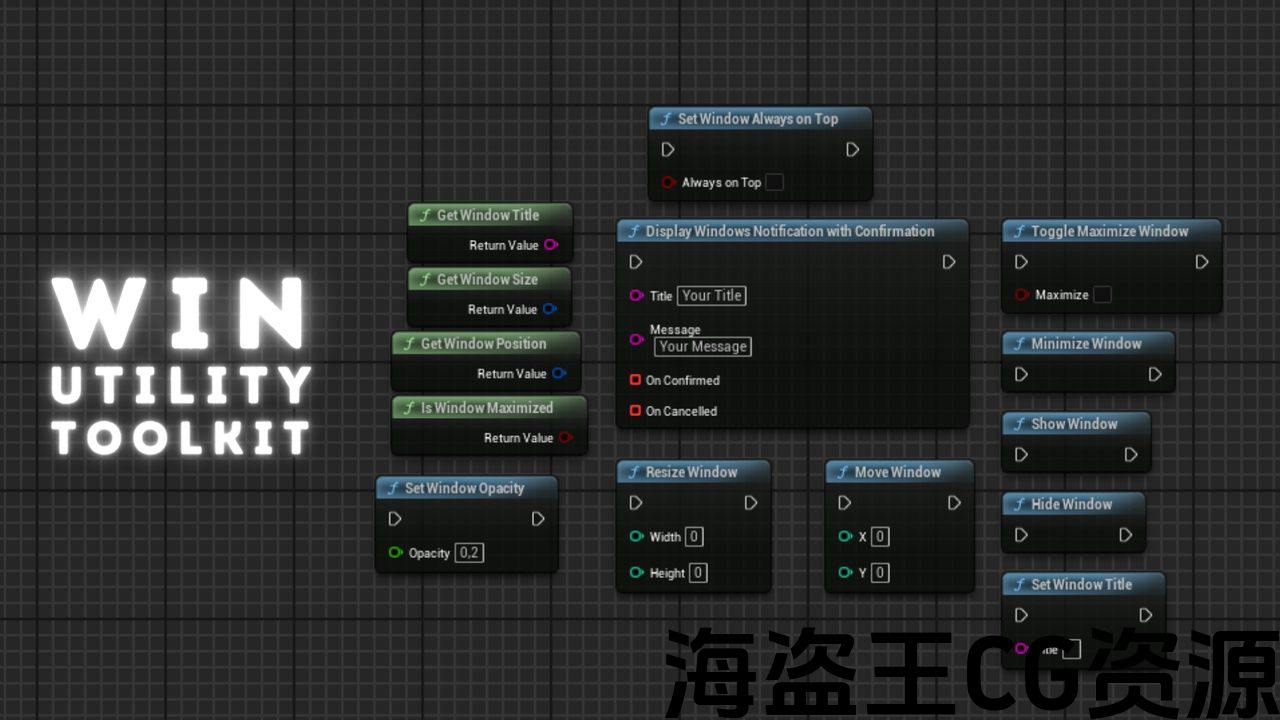
✅Features:
- Minimize Window: Minimizes the specified window.
- Toggle Maximize Window: Toggles between maximizing and restoring the specified window.
- Is Window Maximized: Checks if the specified window is currently maximized.
- Hide Window: Hides the specified window from view.
- Show Window: Shows the specified window if it was previously hidden.
- Resize Window: Changes the size of the specified window to the given dimensions.
- Move Window: Moves the specified window to the given coordinates.
- Get Window Title: Get the title of the specified window.
- Set Window Title: Sets the title of the specified window to the provided string.
- Set Window Always On Top: Sets whether the specified window should always be on top of other windows.
- Get Window Position: Get the position of the specified window on the screen.
- Get Window Size: Get the size of the specified window.
- Set Window Opacity: Adjusts the opacity (transparency) of the specified window.
- Display Windows Notification with Confirmation: Shows a system notification with a confirmation prompt.
Number of Blueprints: 0
Number of C++ Classes: 2
Network Replicated: (No)
Supported Development Platforms: Win64
Supported Target Build Platforms: Win64
✅特征:
- 最小化窗口:最小化指定窗口。
- 切换最大化窗口:在最大化和恢复指定窗口之间切换。
- 窗口是否最大化:检查指定的窗口当前是否最大化。
- 隐藏窗口:从视图中隐藏指定的窗口。
- 显示窗口:显示指定的窗口,如果它以前是隐藏的。
- 调整窗口大小:将指定窗口的大小更改为给定的尺寸。
- 移动窗口:将指定的窗口移动到给定的坐标。
- 获取窗口标题:获取指定窗口的标题。
- 设置窗口标题:将指定窗口的标题设置为提供的字符串。
- 设置窗口始终在顶部:设置指定窗口是否应始终位于其他窗口之上。
- 获取窗口位置:获取指定窗口在屏幕上的位置。
- 获取窗口大小:获取指定窗口的大小。
- 设置窗口不透明度:调整指定窗口的不透明度(透明度)。
- 显示Windows通知并确认:显示带有确认提示的系统通知。
蓝图数目:0
C++类数:2
网络复制:(否)
支持的开发平台:Win64
支持的目标构建平台:Win64
This plugin allows manipulation of the game window within the Unreal Engine on the Windows platform. It includes functions for minimizing, maximizing, hiding, showing, resizing, moving, and modifying the window title. Additionally, it offers the ability to set the window as always on top, retrieve window position and size, adjust opacity, and display system notifications with confirmation. The plugin provides easy access to window operations, useful for creating user interfaces or visual effects within games.
🛠️Support (Discord): >>> HERE <<<
📄Documentation: >>> HERE <<<
📄Example of use: >>> HERE <<<
📣Check the blueprints assets: >>>HERE<<<
Additionally, the plugin provides a function for displaying Windows notifications with confirmation, allowing interaction with the user through message boxes.
This plugin only uses standard Windows API functions and Unreal Engine libraries, and does not incorporate any third-party software or libraries.
该插件允许在Windows平台上的虚幻引擎中操作游戏窗口。 它包括最小化,最大化,隐藏,显示,调整大小,移动和修改窗口标题的功能。 此外,它还提供了设置窗口始终在顶部,检索窗口位置和大小,调整不透明度,并显示系统通知与确认的能力。 该插件可轻松访问窗口操作,可用于在游戏中创建用户界面或视觉效果。
🛠️支持(不和谐): >>>这里<<<
📄文件: >>>这里<<<
📄使用示例: >>>这里<<<
查看蓝图资产:>>>这里<<<
此外,该插件还提供了一个功能,用于显示带有确认的Windows通知,允许通过消息框与用户进行交互。
此插件仅使用标准Windows API函数和虚幻引擎库,不包含任何第三方软件或库。
评论(0)