


Features:
- Real-Time PBR Compliance Check:
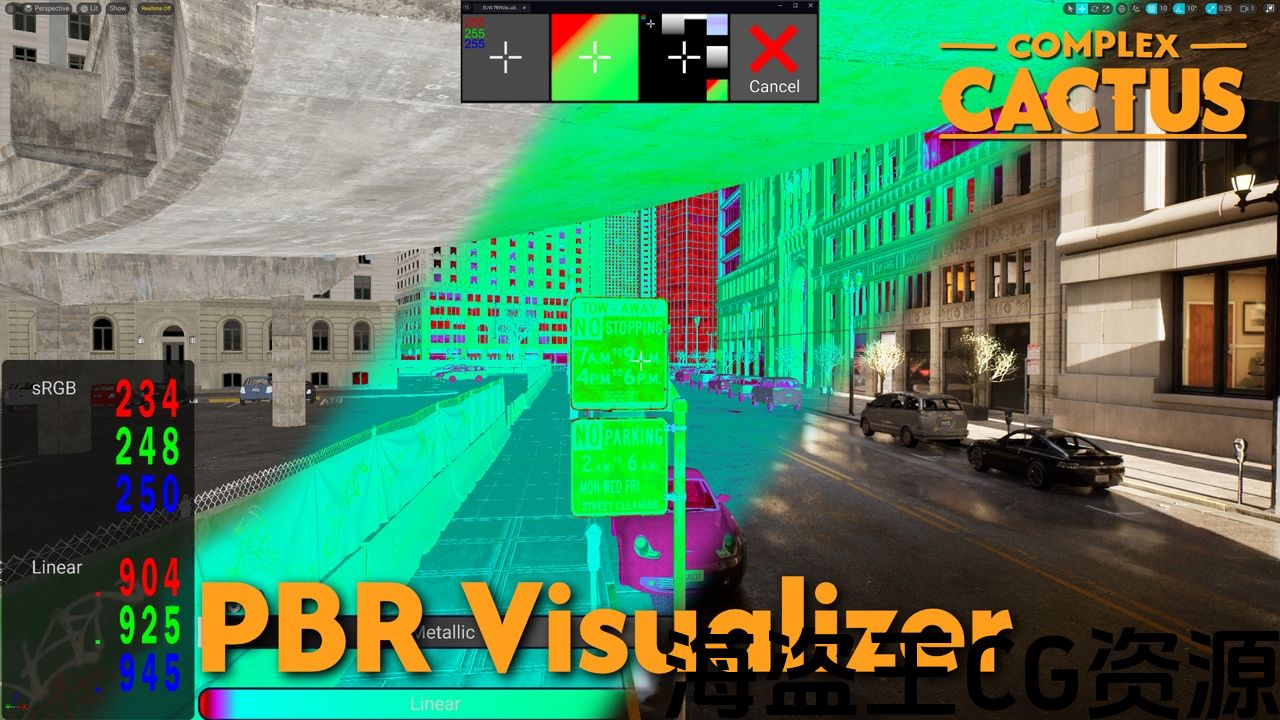
- Instantly visualize whether Base Color values fall within correct PBR ranges for both dielectric and metallic materials.
- Color-coded overlays provide immediate visual feedback.
- Detailed Pixel-Level Readouts:
- Crosshair-based pixel sampling allows you to inspect sRGB and Linear values at the center of your screen.
- Quickly determine if a pixel’s color is precisely what you expect, and confirm whether it adheres to PBR guidelines.
- Material Property Debug Views:
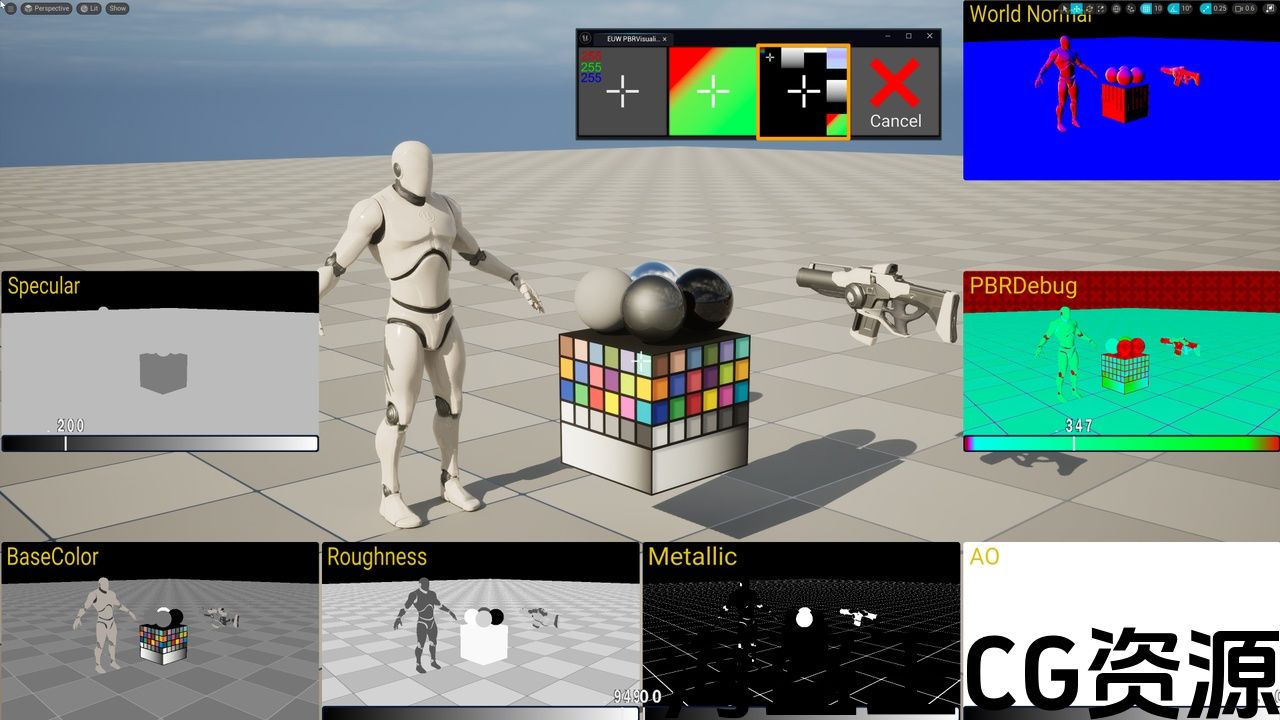
- Access an in-editor grid of viewport panels displaying Base Color Roughness, Metallic, Specular, Normal, AO and PBR Visualization Debug views with sliders displaying center-pixel values.
- Editor Utility Widget Integration:
- Control all debug modes from a dedicated Editor Utility Widget.
Code Modules: PBRVisualizer – Runtime: Provides basic framework for enabling Post Process Debug views during gameplay.
Number of C++ Classes: 2
Number of Blueprints: 3
Network Replicated: NoNumber of Material Functions: 8
Number of Materials and Material Instances: 5 and 3
Number of Material Parameter Collections: 2
Number of Textures: 20
Texture Resolutions: 64×64 to 1024×256
Supported Development Platforms: Window Yes, Mac No
Supported Target Build Platforms: Windows
Documentation Link: https://github.com/ComplexCactus/PBRVisualizerWiki/wiki
功能:
- 实时 PBR 合规性检查:
- 即时可视化电介质和金属材料的基色值是否落在正确的 PBR 范围内。
- 颜色编码叠加提供即时视觉反馈。
- 详细的像素级读数:
- 基于十字线的像素采样允许您检查屏幕中心的 sRGB 和线性值。
- 快速确定像素的颜色是否正是您所期望的,并确认其是否符合 PBR 准则。
- 材质属性调试视图:
- 访问编辑器内的视口面板网格,显示基色粗糙度、金属、镜面、法线、AO 和 PBR 可视化调试视图,带有显示中心像素值的滑块。
- 编辑器实用程序小部件集成:
- 从专用编辑器实用程序小部件控制所有调试模式。
代码模块: PBRVisualizer – 运行时:提供在游戏过程中启用后期处理调试视图的基本框架。
C++ 类数量:2
蓝图数量:3
网络复制:无材质函数数量:8
材质和材质实例数量:5 和 3
材质参数集合数量:2
纹理数量: 20
纹理分辨率:64×64 至 1024×256
支持的开发平台:Window 是,Mac 否
支持的目标构建平台:Windows
文档链接:https://github.com/ComplexCactus/PBRVisualizerWiki/wiki
“PBR Visualizer – a Material Debugging & Visualization Toolset”
Version 1.1.0
New in 1.1.0 – Customization
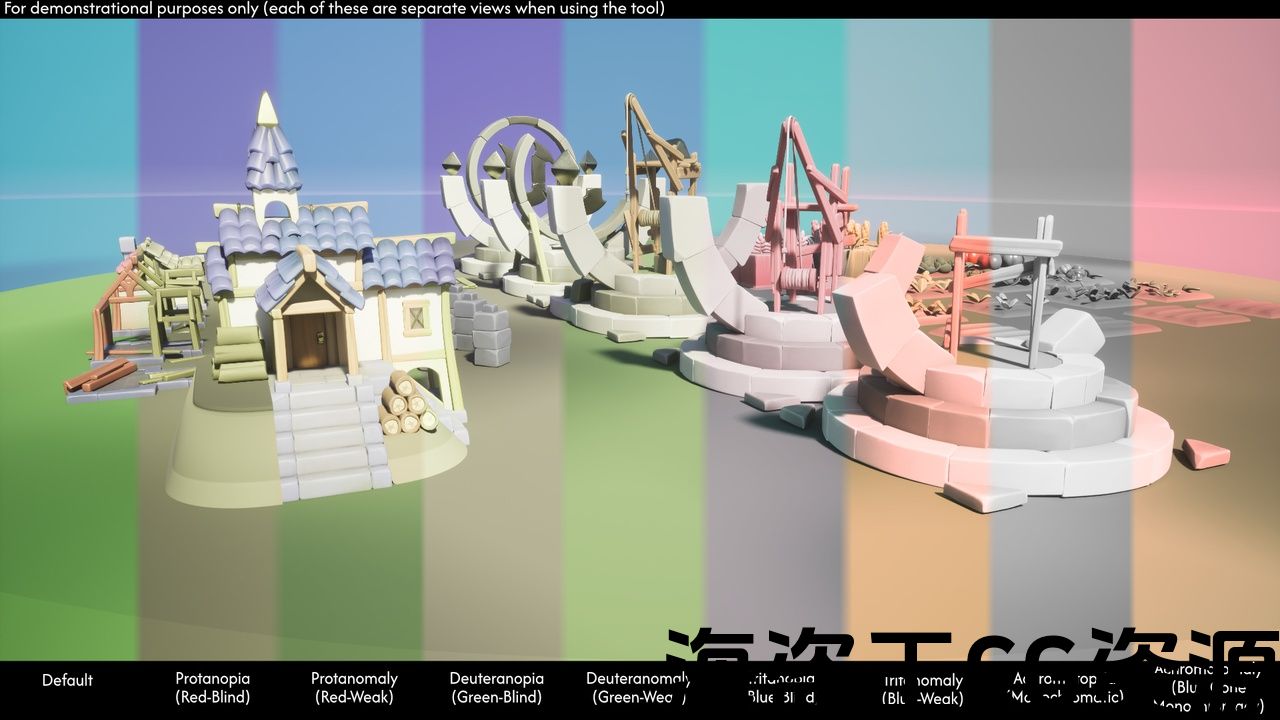
New in 1.1.0 – Color Blindness Visualizations
Empower your material workflows with real-time PBR compliance checks and intuitive visual diagnostics.
NOTE: Images used on this store page are to showcase the tools functionality only. The assets used such as the Unreal Mannequin, Weapon and Epic’s City Sample Buildings pack and Cropout sample are NOT included in this Plugin.
PBR Visualizer is a comprehensive debugging and visualization toolkit designed to help you quickly identify and resolve PBR-related material issues within your Unreal Engine projects. By providing real-time feedback on Base Color ranges, Metallic, Roughness, Specular, and Ambient Occlusion values, this suite streamlines the troubleshooting process—ensuring that your materials consistently meet industry-standard PBR guidelines.
With just a click, you can access custom debug views and overlays directly in your Unreal Engine viewport. PBR Visualizer makes it straightforward to pinpoint the root cause of material discrepancies, highlight out-of-range values, and confirm that your surfaces are conforming to expected material values. These features come packaged in an intuitive Editor Utility Widget.
You could also add the tool’s visualizations to your existing Buffer Visualization options for seamless toggling during lookdev and production, unlocking the ability to assign hotkeys.
Whether you’re a professional environment artist, technical artist, or a solo developer striving for polished visuals, PBR Visualizer is your one-stop solution for PBR material compliance and quick visual diagnostics.
Key Features:
- Real-Time PBR Compliance Check:
- Instantly visualize whether Base Color values fall within correct PBR ranges for both dielectric and metallic materials.
- Color-coded overlays (Red for out-of-range, Green for in-range, Blue for marginal values) provide immediate visual feedback.
- Detailed Pixel-Level Readouts:
- Crosshair-based pixel sampling allows you to inspect exact sRGB and Linear values at the center of your screen.
- Quickly determine if a pixel’s color is precisely what you expect, and confirm whether it adheres to PBR guidelines.
- Comprehensive Material Property Debug Views / Validator:
- Access an in-editor grid of viewport panels displaying Base Color Roughness, Metallic, Specular, Normal, AO and PBR Visualization Debug views with sliders displaying center-pixel values.
- Compare and contrast material attributes side-by-side to diagnose potential issues or imperfections.
- Editor Utility Widget Integration:
- Control all debug modes from a dedicated Editor Utility Widget.
- Rapid Troubleshooting & Diagnosis:
- Ideal for debugging unexpected shading, ensuring materials appear consistent across different lighting conditions and scenes.
- Identify subtle mistakes in textures, Base Color settings, or metallic workflows, reducing iteration times and guesswork.
“PBR Visualizer – 材质调试和可视化工具集”
版本 1.1.0
1.1.0 中的新功能 – 自定义
1.1.0 中的新功能 – 色盲可视化
通过实时 PBR 合规性检查和直观的视觉诊断为您的材质工作流程提供支持。
注意:此商店页面上使用的图像仅用于展示工具功能。使用的资源(例如虚幻人体模型、武器和 Epic 的城市示例建筑包和裁剪示例)不包含在此插件中。
PBR Visualizer是一个全面的调试和可视化工具包,旨在帮助您快速识别和解决问题虚幻引擎项目中与 PBR 相关的材质问题。通过提供有关基色范围、金属色、粗糙度、镜面反射和环境光遮挡值的实时反馈,该套件简化了故障排除过程,确保您的材质始终符合行业标准 PBR 准则。
只需单击一下,您就可以直接在虚幻引擎视口中访问自定义调试视图和叠加层。 PBR Visualizer 可以轻松查明材料差异的根本原因,突出显示超出范围的值,并确认您的表面符合预期的材料值。这些功能打包在直观的编辑器实用程序小部件中。
您还可以将该工具的可视化添加到现有的缓冲区可视化选项中,以便在外观开发和生产过程中无缝切换,从而解锁分配热键的功能。
无论您是专业环境艺术家、技术艺术家,还是追求精美视觉效果的独立开发人员,PBR Visualizer 都是您实现 PBR 材质合规性和快速视觉诊断的一站式解决方案。
关键功能:
- 实时 PBR 合规性检查:
- 即时可视化电介质和金属材料的基色值是否落在正确的 PBR 范围内。
- 颜色编码叠加(红色表示超出范围,绿色表示范围内,蓝色表示边缘值)提供即时视觉效果反馈。
- 详细的像素级读数:
- 基于十字准线的像素采样允许您检查屏幕中心的精确 sRGB 和线性值。
- 快速确定像素的颜色是否正是您所期望的,并确认其是否符合 PBR
- 综合材质属性调试视图/验证器:
- 访问编辑器内的视口面板网格,显示基色粗糙度、金属、镜面反射、法线、AO 和 PBR 可视化调试视图以及显示中心像素值的滑块。
- 并排比较和对比材质属性以诊断潜在问题或缺陷。
- 编辑器实用程序小部件集成:
- 从专用编辑器实用程序小部件控制所有调试模式。
- 快速故障排除和诊断:
- 非常适合调试意外着色,确保材质在不同光照条件和环境下显示一致。
- 识别纹理、基色设置或金属工作流程中的细微错误,减少迭代时间和猜测。
评论(0)