
Features:
- The ghost capturer blueprint (takes care of the ghosting post effect).
- Ghost translucent material.
- Some noise textures and assets used to create the effects.
Number of Blueprints: 1
Network Replicated: Local
Supported Development Platforms:
- Windows: Yes
- Mac: Yes
- VR/AR: Not supported yet
Documentation:
In addition to this video, several tutorial levels are available in the pack.
How to use :
• You should change the Custom Depth-Stencil pass value to Enabled with Stencil in Project settings\Engine\Rendering\Postprocessing. If you don’t do this you will encounter visual glitches when using the ghost capturer.
• For custom transparent shaders you would want to use with the ghost capturer, make sure to enable custom depth writes and to set the mask clip value to 0 in the master material.
• For 5.3/4 : You have to enable “Override Aspect Ratio Axis Constraint” on your game camera and set the “Aspect Ratio Axis Constraint” parameter to “Maintain X-Axis FOV“.
Good to know :
The post effect’s quality is dependent on your game’s frame rate since the game’s view capture is used as an input to the effect. So the higher FPS you have, the better the effect will look.
特征:
- 幽灵捕捉者蓝图(照顾鬼影后效果)。
- 鬼半透明材料。
- 用于创建效果的一些噪点纹理和资源。
蓝图数目:1
网络复制:本地
支持的开发平台:
- Windows:是的
- Mac:是的
- VR/AR:暂不支持
文件:
除了这个视频,几个教程级别是可用的包。
如何使用 :
•您应该在项目设置\Engine\Rendering\Postprocessing中将自定义Depth-Stencil传递值更改为启用模板。 如果你不这样做,你会在使用幽灵捕捉器时遇到视觉故障。
•对于要与ghost capturer一起使用的自定义透明着色器,请确保启用自定义深度写入,并在主材质中将遮罩剪辑值设置为0。
*对于5.3/4:您必须启用”复盖纵横比轴约束“在你的游戏摄像头,并设置”纵横比轴约束“参数至”保持X轴FOV“.
幸好知道了。 :
后期效果的质量取决于游戏的帧速率,因为游戏的视图捕获用作效果的输入。 所以你的FPS越高,效果就越好。

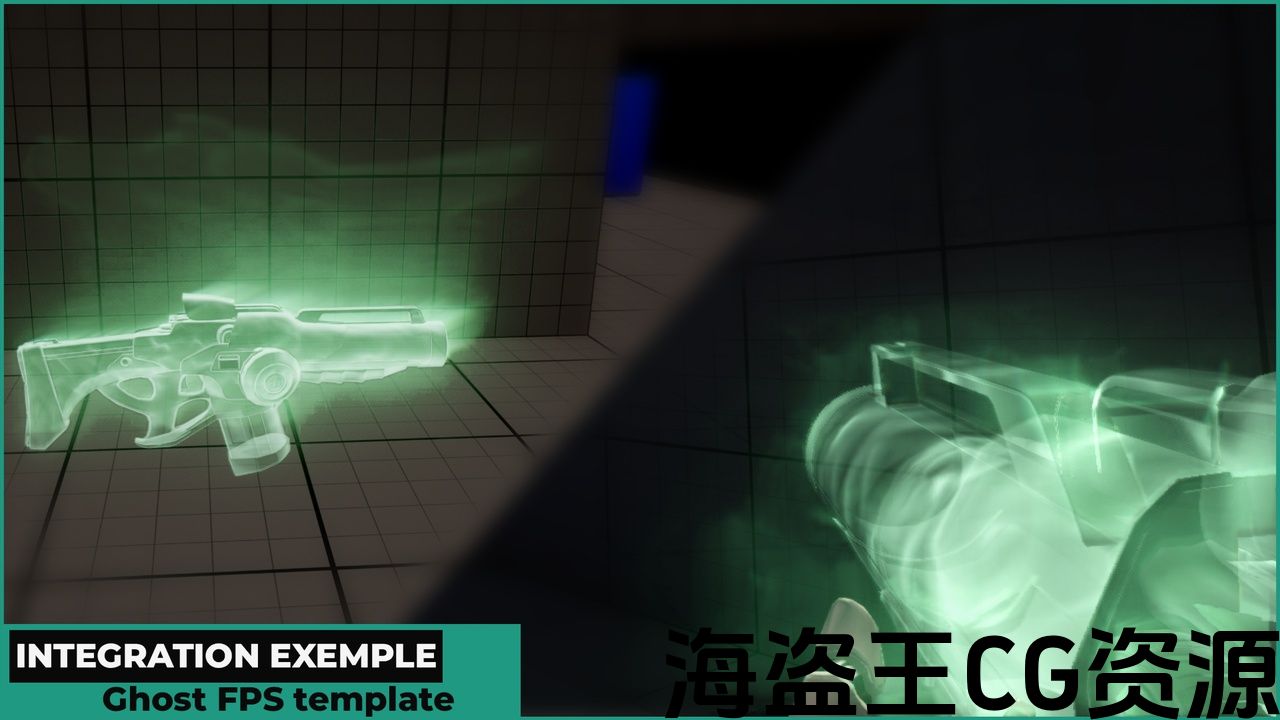


Attention: The 3D assets showcased in the preview images are not part of the package and are solely intended for illustrative purposes.
Description :
Our ghost effect pack features
-
A screen space ghosting post effect.
-
A standard material that you can use to give any object a fancy ghost look! Useful if you can’t create your own.
Both can work independently from each other and this gives you full artistic control over your ghost visuals.
Both are very customizable and have plenty of relevant parameters exposed.
Implementation tutorial :
Support :
marketplace@aberratic.com
Discord :
Features:
-
The ghost capturer blueprint (takes care of the ghosting post effect).
-
Ghost translucent material.
-
Some noise textures and assets used to create the effects.
Number of Blueprints: 1
Network Replicated: Local
Supported Development Platforms:
-
Windows: Yes
-
Mac: Yes
-
VR/AR: Not supported yet
Documentation:
In addition to this video, several tutorial levels are available in the pack.
How to use :
• You should change the Custom Depth-Stencil pass value to Enabled with Stencil in Project settings\Engine\Rendering\Postprocessing. If you don’t do this you will encounter visual glitches when using the ghost capturer.
• For custom transparent shaders you would want to use with the ghost capturer, make sure to enable custom depth writes and to set the mask clip value to 0 in the master material.
• For 5.3/4 : You have to enable “Override Aspect Ratio Axis Constraint” on your game camera and set the “Aspect Ratio Axis Constraint” parameter to “Maintain X-Axis FOV“.
Good to know :
The post effect’s quality is dependent on your game’s frame rate since the game’s view capture is used as an input to the effect. So the higher FPS you have, the better the effect will look.
注意:预览图像中显示的3d资源不是包的一部分,仅用于说明目的。
资料描述 :
我们的幽灵效果包功能
-
个屏幕空间重影帖效果。
-
一个标准的材料,你可以用它来给任何物体一个奇特的幽灵外观! 有用的,如果你不能创建自己的。
两者都可以彼此独立工作,这给你完全的艺术控制你的幽灵视觉。
两者都是非常可定制的,并有大量的相关参数公开。
实现教程 :
支援服务 :
marketplace@aberratic.com
不和谐 :
特征:
-
幽灵捕捉者蓝图(照顾鬼影后效果)。
-
鬼半透明材料。
-
用于创建效果的一些噪点纹理和资源。
蓝图数目:1
网络复制:本地
支持的开发平台:
-
Windows:是的
-
Mac:是的
-
VR/AR:暂不支持
文件:
除了这个视频,几个教程级别是可用的包。
如何使用 :
•您应该在项目设置\Engine\Rendering\Postprocessing中将自定义Depth-Stencil传递值更改为使用Stencil启用。 如果你不这样做,你会在使用幽灵捕捉器时遇到视觉故障。
•对于要与ghost capturer一起使用的自定义透明着色器,请确保启用自定义深度写入,并在主材质中将遮罩剪辑值设置为0。
*对于5.3/4:您必须启用”复盖纵横比轴约束“在你的游戏摄像头,并设置”纵横比轴约束“参数至”保持X轴FOV“.
幸好知道了。 :
后期效果的质量取决于游戏的帧速率,因为游戏的视图捕获用作效果的输入。 所以你的FPS越高,效果就越好。
评论(0)